Quick Asset Allocation
Assigning assets to the right people quickly is essential for operational efficiency — whether you're issuing tools to technicians, allocating equipment to employees, or assigning assets to customers. The Quick Asset Allocation feature in DreamzCMMS streamlines this process, allowing you to assign one or multiple assets to an employee or customer in just a few clicks, without navigating through individual asset records.
Overview
Quick Asset Allocation provides a dedicated, simplified interface for bulk asset assignment. Instead of opening each asset record individually to update its allocation, you can select multiple assets, choose the recipient type (employee or customer), and save all allocations in a single action.
This feature is ideal for:
- Issuing tools or equipment to field technicians at the start of a shift or project.
- Allocating assets to customers as part of a service or rental agreement.
- Reassigning multiple assets quickly when personnel or project assignments change.
Before You Begin
- You must have Admin or Manager permissions to allocate assets.
- The assets you want to allocate must already exist in DreamzCMMS. See How to Manage Various Asset Information or Import Assets from Excel
- The employee or customer you are allocating assets to must already exist in the system before they can be selected as a recipient.
How to Use Quick Asset Allocation
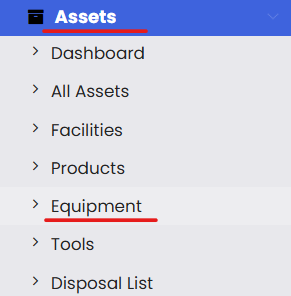
Step 1 – Navigate to Equipment
From the left-hand navigation menu, click on Assets, then select Equipment.
Step 2 – Open Quick Asset Allocation
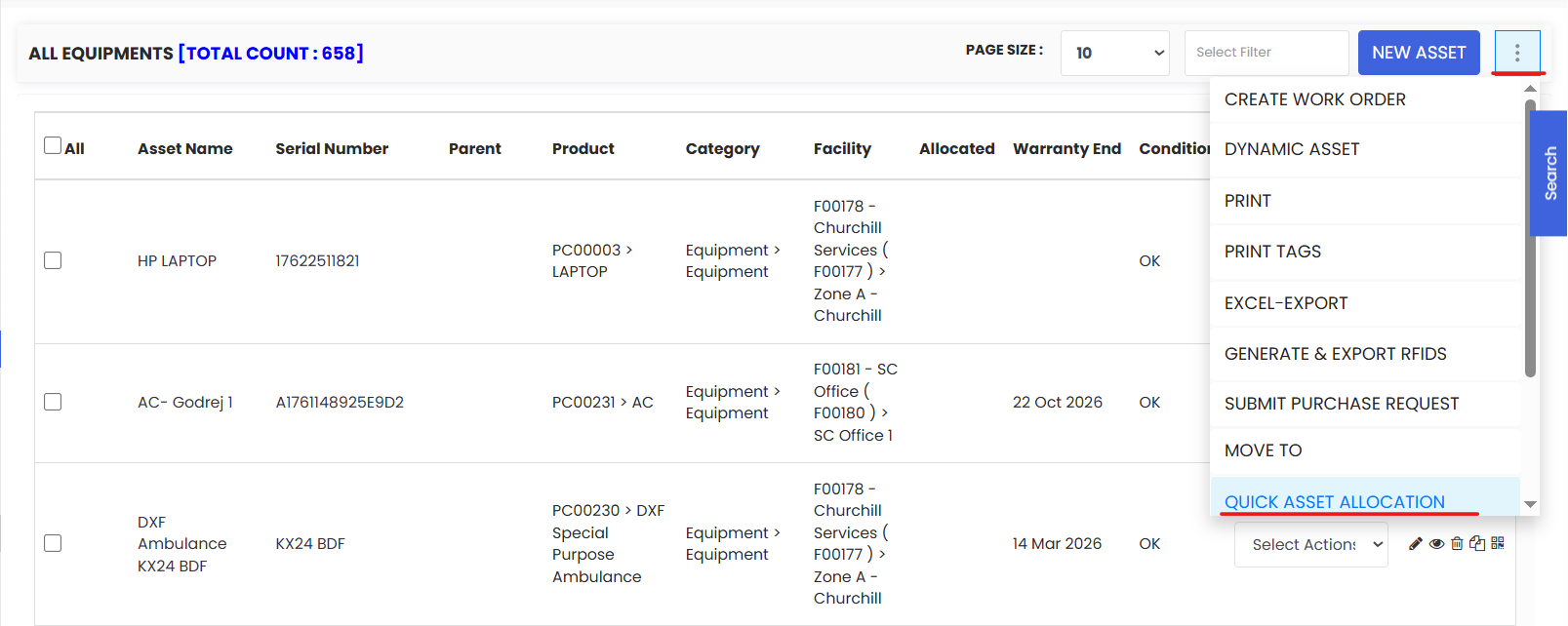
On the Equipment listing page, click the three-dot menu (⋮) in the top-right corner. From the dropdown, select Quick Asset Allocation.
Step 3 – Select the Assets
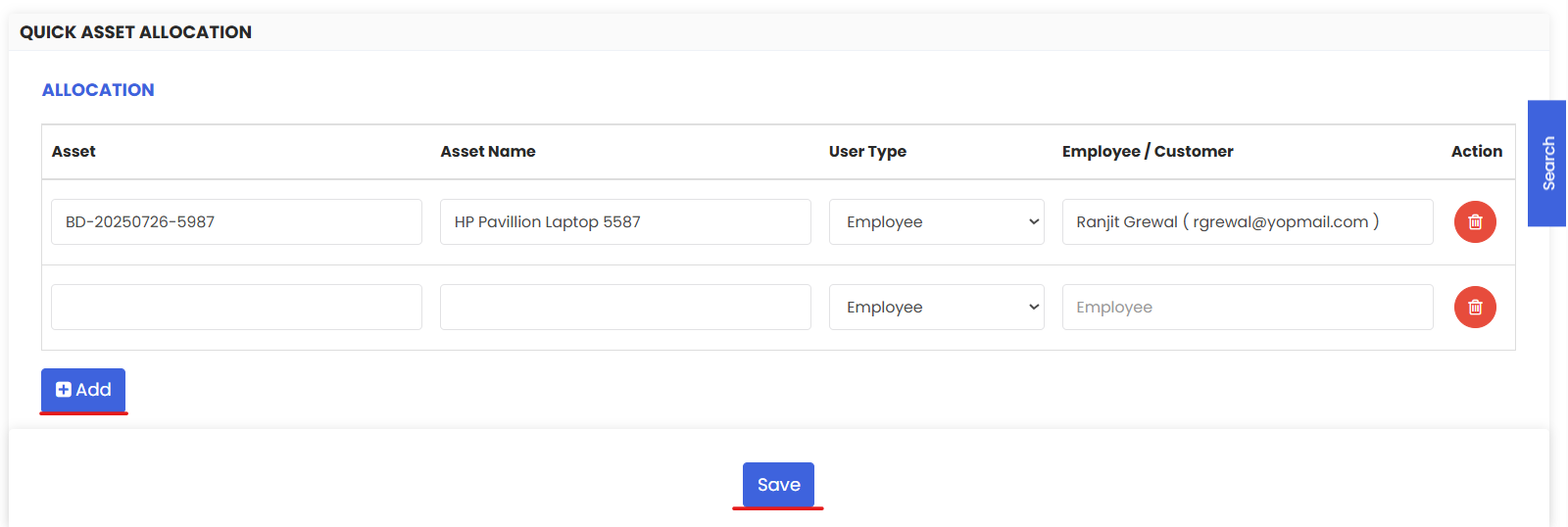
On the Quick Asset Allocation page, search for and select the assets you want to allocate. You can select multiple assets at once to process a batch allocation in a single step.
Tip: Use the search or filter options to quickly find assets by name, category, or location — particularly useful when allocating a large number of assets.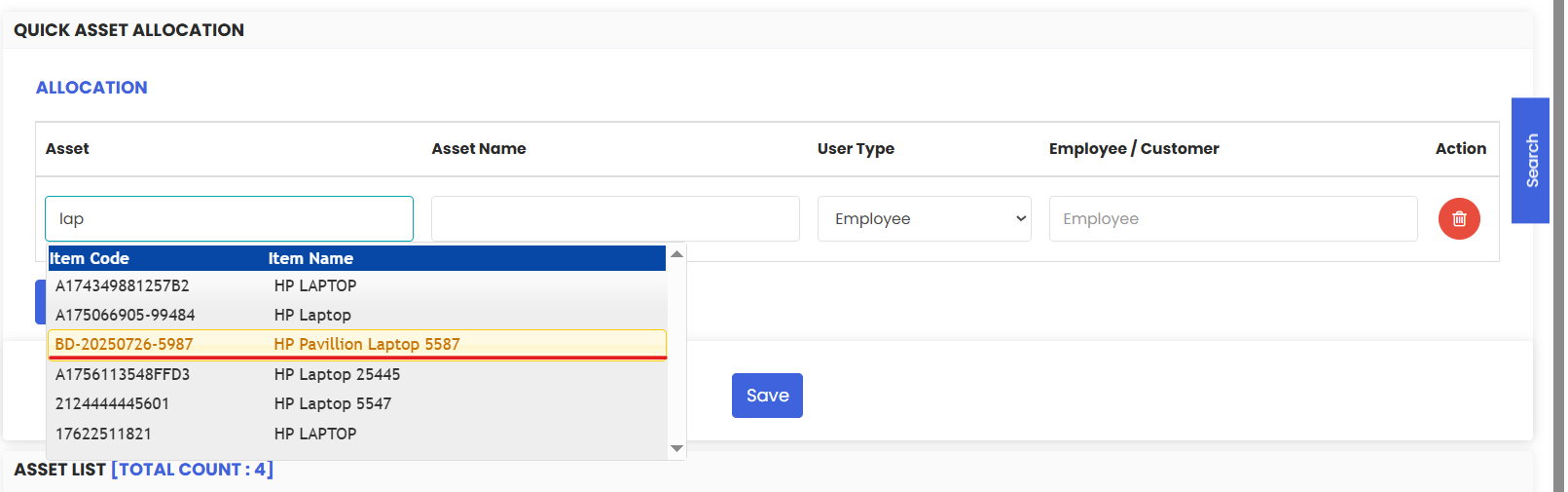
Step 4 – Choose the Recipient Type
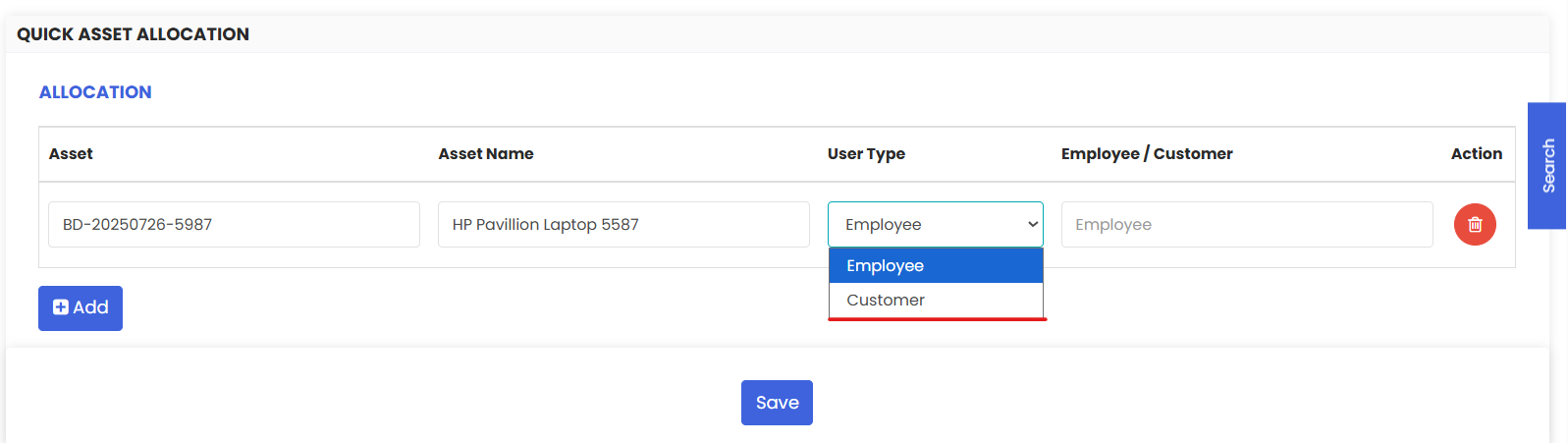
Select whether you are allocating the assets to an:
- Employee — An internal staff member within your organization (e.g., a technician, engineer, or field worker).
- Customer — An external customer or client (e.g., for a service agreement, rental, or project-based asset deployment).
Step 5 – Select the Recipient
Once the recipient type is selected, use the search field to find and select the specific employee or customer name you are allocating the assets to.
Step 6 – Click Save
Click Save to confirm the allocation. All selected assets will be assigned to the chosen recipient simultaneously. The allocation will be reflected on each asset's record.
Tips for Managing Asset Allocations
- Use Quick Asset Allocation for bulk assignments — If you're equipping a team for a project or shift, this feature saves significant time compared to editing assets individually.
- Keep your employee and customer records up to date — Allocations can only be made to existing records in the system. Ensure your staff and customer lists are current before running allocations.
- Reallocate promptly when assignments change — When an employee leaves or a project ends, update the asset allocation immediately to maintain accurate records of who holds which assets.
- Combine with QR codes or RFID — Use asset tags to quickly verify which assets have been allocated during physical stocktakes. See Print QR Code or Barcode of Equipment ← [HYPERLINK → Print QR article] and Generate RFIDs ← [HYPERLINK → Generate RFIDs article]
- Review allocations regularly — Periodically audit your allocated assets to identify any that have not been returned, are overdue for reallocation, or are assigned to inactive employees.
Frequently Asked Questions
Can I allocate the same asset to both an employee and a customer at the same time?
No. Each asset can only be allocated to one recipient at a time — either an employee or a customer. To reassign an asset, simply run a new allocation to update the recipient.
Can I allocate multiple assets to multiple different recipients in one action?
No. Each Quick Asset Allocation session assigns all selected assets to a single recipient. To allocate assets to different recipients, run separate allocation sessions for each person or customer.
Can I allocate Tools as well as Equipment using this feature?
This feature is accessed from the Equipment listing page. Check whether a similar Quick Asset Allocation option is available under Assets → Tools for tool allocation.
How do I deallocate or return an asset?
To deallocate an asset, open the asset record and update the allocation field, or run a new Quick Asset Allocation and assign the asset back to the organization or a new recipient. Check your system settings for a dedicated return or deallocation workflow.
Where can I see all assets currently allocated to a specific employee or customer?
Use the filter and search options on the Equipment listing page to filter by allocated user or customer. This gives you a quick view of all assets currently assigned to a specific person.
Does allocation affect the asset's location in DreamzCMMS?
Allocation records who holds an asset, but does not automatically update the asset's physical location. If the asset has moved to a new facility or site, update the location field on the asset record separately. See Create Asset Locations
Related Articles
How to Manage Various Asset Information