How to Revaluate an Asset
Asset revaluation updates an asset's book value to reflect its current fair market value — adjusting for market changes, significant upgrades, or impairment. Over time, the original purchase price of an asset may no longer accurately represent its true worth, and keeping book values current is essential for accurate financial reporting, compliance, and informed decision-making on the asset lifecycle.
In DreamzCMMS, a revaluation entry records the new value, reason, effective date, and supporting documents, and automatically recalculates depreciation from the revaluation date — keeping your asset register accurate, audit-ready, and aligned with your finance and GL policies.
Overview
Asset revaluation is managed from the Financials tab of an equipment record. Once a revaluation is saved, the asset's book value is updated to the new amount, and depreciation is recalculated going forward from the effective date of the revaluation.
Important: Asset revaluation directly affects your financial records and depreciation calculations. This action should only be performed by authorized personnel in coordination with your finance team.
Before You Begin
You must have Admin or Manager permissions to revaluate an asset.
Confirm the new fair value with your finance team or an independent assessor before entering it in the system.
Have the following details ready:
- New revaluated amount — The updated fair market value of the asset.
- Extended lifespan (if applicable) — If the revaluation is due to a significant upgrade or refurbishment, you may need to extend the asset's useful life.
- Reason for revaluation — A clear justification (e.g., market appreciation, major upgrade, impairment assessment).
- Supporting documentation — Valuation reports, appraisal certificates, or upgrade invoices.
Ensure the asset's original purchase value and depreciation details are correctly set up in the Financials tab before proceeding. See How to Manage Various Asset Information
How to Revaluate an Asset
Step 1 – Navigate to Equipment
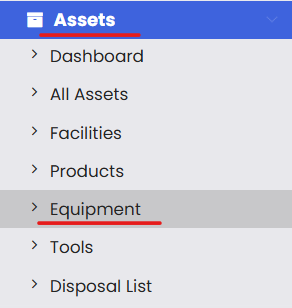
From the left-hand navigation menu, click on Assets, then select Equipment.
Step 2 – Open the Equipment Record
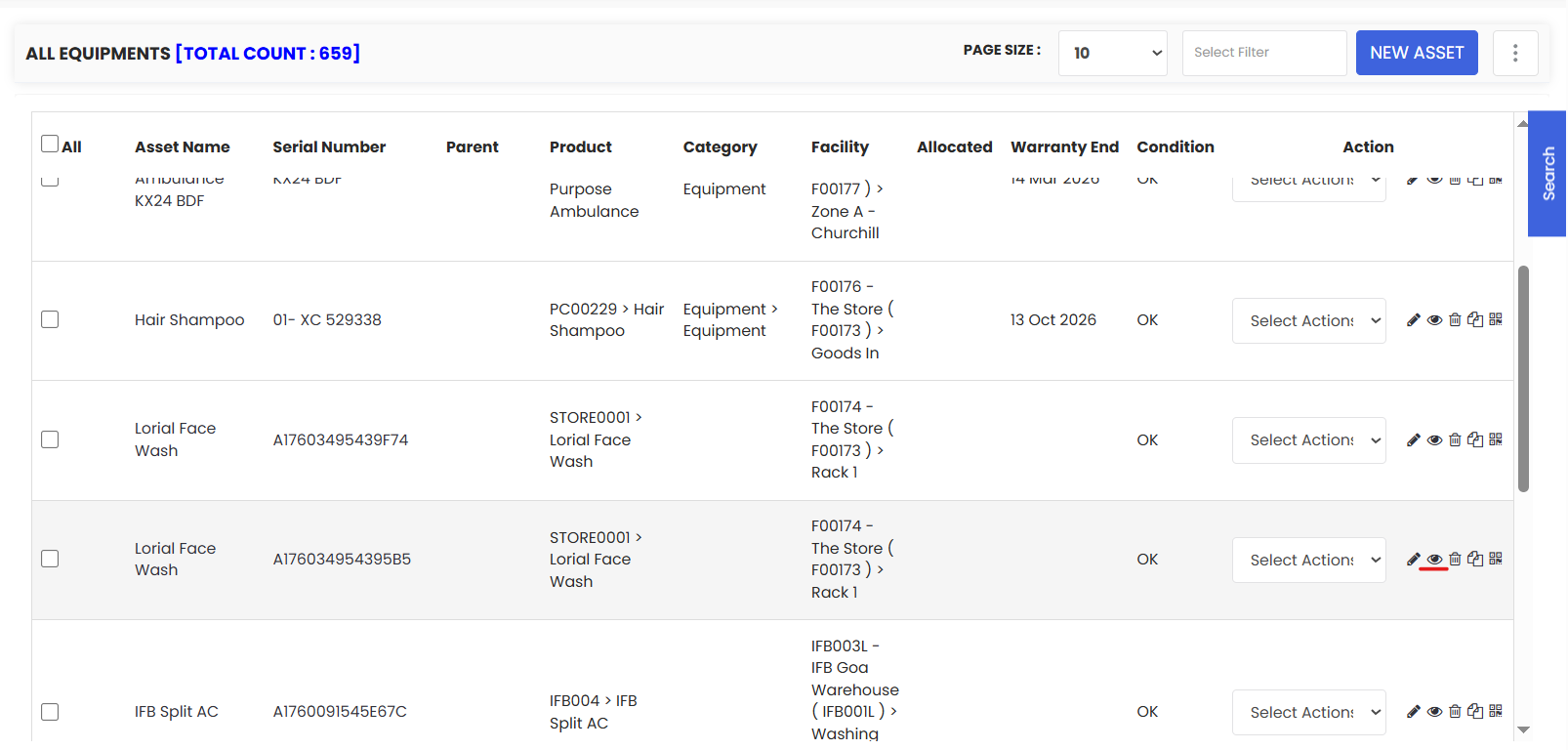
On the Equipment listing page, find the asset you want to revaluate. Click View to open its full detail page.
Step 3 – Go to the Financials Tab
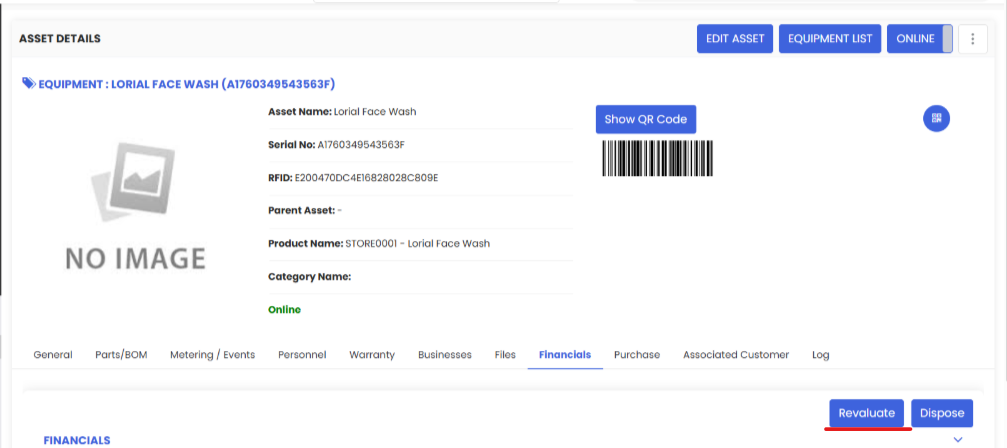
On the equipment detail page, click the Financials tab. This is where all financial actions for the asset are managed, including revaluation and disposal.
Step 4 – Click the Revaluate Button
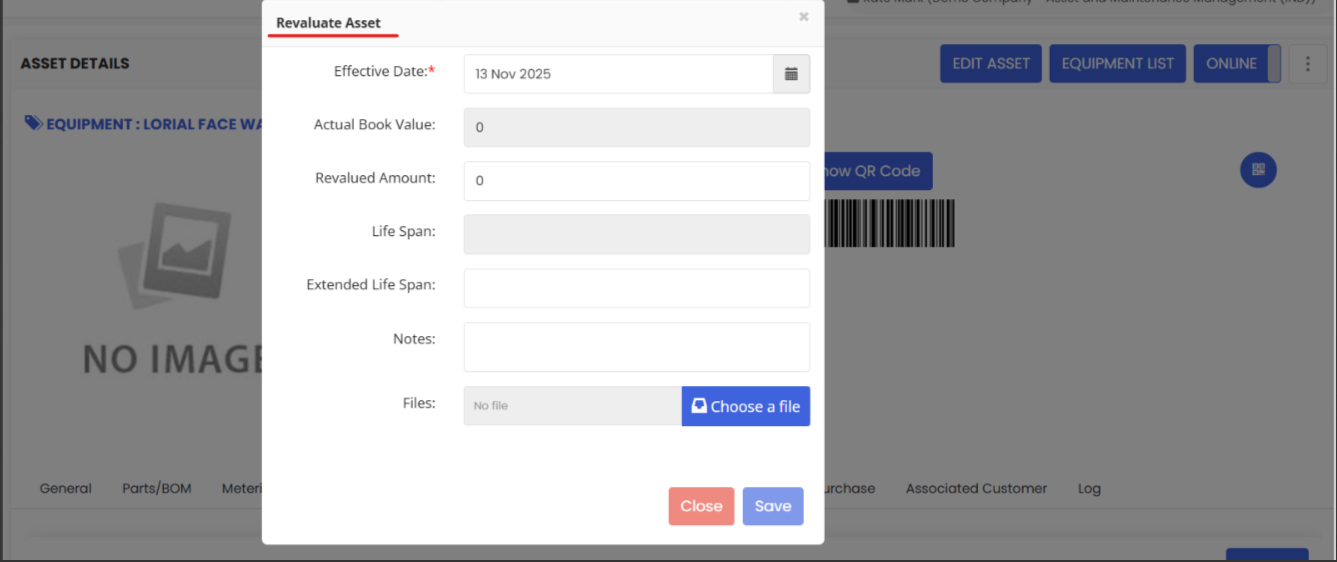
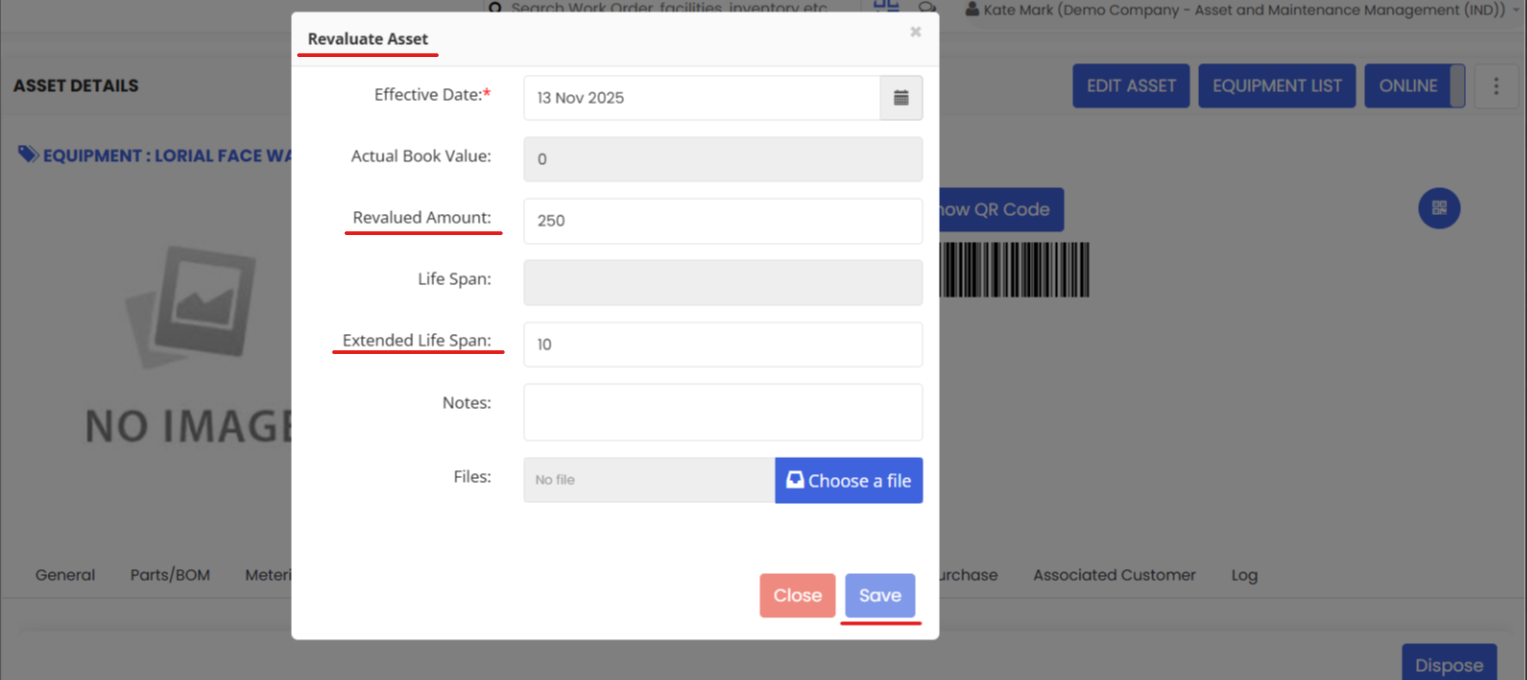
Within the Financials tab, locate and click the Revaluate button. A revaluation pop-up will appear.
Step 5 – Fill in the Revaluation Details
In the revaluation pop-up, complete the following fields:
- Revaluated Amount (required) — Enter the new fair market value of the asset. This will replace the current book value and become the basis for future depreciation calculations.
- Extended Lifespan (if applicable) — If a major upgrade or refurbishment has extended the useful life of the asset, enter the additional time to be added to its expected end of life. For example, if a machine was refurbished and its life extended by 3 years, enter that here.
- Comments / Reason (recommended) — Document the reason for the revaluation clearly (e.g., "Market appraisal — property value increased", "Post-refurbishment revaluation", "Impairment — flood damage"). This is essential for audit trail purposes.
Tip: Always enter a detailed reason in the comments field. Revaluation entries without clear justification can raise compliance concerns during audits.
Step 6 – Click Save
Once all details are filled in, click Save to record the revaluation. The asset's book value will be updated to the new amount, and depreciation will be recalculated from the effective date of the revaluation.
Tips for Managing Asset Revaluations
- Coordinate with your finance team before revaluating — Revaluation impacts book values, depreciation, and potentially tax calculations. Always get sign-off before making changes.
- Revaluate after significant upgrades — If a major refurbishment or capital improvement has been made to an asset, a revaluation ensures the increased value and extended life are properly reflected.
- Document everything — Attach the supporting valuation report or appraisal to the Files tab and add a detailed reason in the comments field for every revaluation entry.
- Schedule periodic revaluations — For high-value assets such as property, plant, and equipment, consider scheduling regular revaluations (e.g., annually or every 3 years) to keep book values current.
- Use revaluation for impairment too — If an asset has lost value due to damage, obsolescence, or market decline, a downward revaluation (impairment) should also be recorded to reflect the reduced value accurately.
Frequently Asked Questions
What is the difference between revaluation and depreciation?
Depreciation is the gradual reduction of an asset's book value over time based on a fixed schedule (e.g., straight-line or reducing balance). Revaluation is a one-time adjustment to reset the book value to its current fair market value — either upward or downward — after which depreciation continues from the new value.
Can I revaluate an asset downward (impairment)?
Yes. If an asset has decreased in value due to damage, market decline, or obsolescence, you can enter a lower revaluated amount to reflect the impairment. This is an important accounting practice for maintaining accurate financial records.
Will revaluation affect past depreciation records?
No. Revaluation only affects depreciation going forward from the effective date. All historical depreciation records remain unchanged and are preserved in the audit trail.
Can I view a history of all revaluations for an asset?
Yes. All revaluation entries are recorded in the asset's financial history and are accessible via the Financials tab and Log tab for a full audit trail.
Can I revaluate Tools as well as Equipment?
Yes. The same revaluation process applies to Tools. Navigate to Assets → Tools, find the relevant item, and follow the same steps outlined in this article.
How does revaluation interact with asset disposal?
If an asset is revaluated and later disposed of, the disposal will be based on the most recent revaluated book value. Ensure the book value is current before initiating a disposal. See How to Dispose of an Asset.
Related Articles
How to Manage Various Asset Information
How to Add Meter Readings and Event Details for Equipment
Print QR Code or Barcode of Equipment