DreamzCMMS FMCG Web Portal with RFID
Scanning cases on the production floor is only half the story — your management team still needs a place to set up the data behind it and see the results. The DreamzCMMSRFID web portal is where every facility, product, and tagged asset is managed, and where every scan and shipment turns into a reportable, exportable record.
Overview
Everything you use in the mobile app is backed by master data in the web portal. The Facility module lists every plant, warehouse, and production area across your organization; the Equipment module maintains a registry of every tagged asset, including its serial number, parent product, assigned facility, and current status; and the Product module contains your complete catalog of SKUs and packaging types. Every action performed in the app is recorded here, giving you a complete audit trail: the FacilityWise scan report shows every RFID or QR code scan by location, the LocationWise report verifies dispatch and receiving records side-by-side for every shipment, and the Enquiry and Enquiry Summary reports roll up stock checks across facilities. All of it exports directly to Excel or PDF, with dedicated exports for SAP and completed dispatch records. Between the mobile app on the production floor and the web portal in the office, you get a complete, tamper-proof record of every product from the moment it's registered until it leaves your facility.
Here is a reference video:
Before You Begin
- You must have web portal access with permissions to view or manage Facility, Equipment, Product, and Reports.
- Your plants, warehouses, and production areas should already be set up in the Facility module — see Setting Up Plant, Warehouse, and Location Hierarchies if you haven't done this yet.
- Have some dispatch and receiving activity already logged in the mobile app, since several of these reports compare scans across both sides of a transfer.
How to Use the DreamzCMMSRFID Web Portal
Step 1 – Review Your Master Data
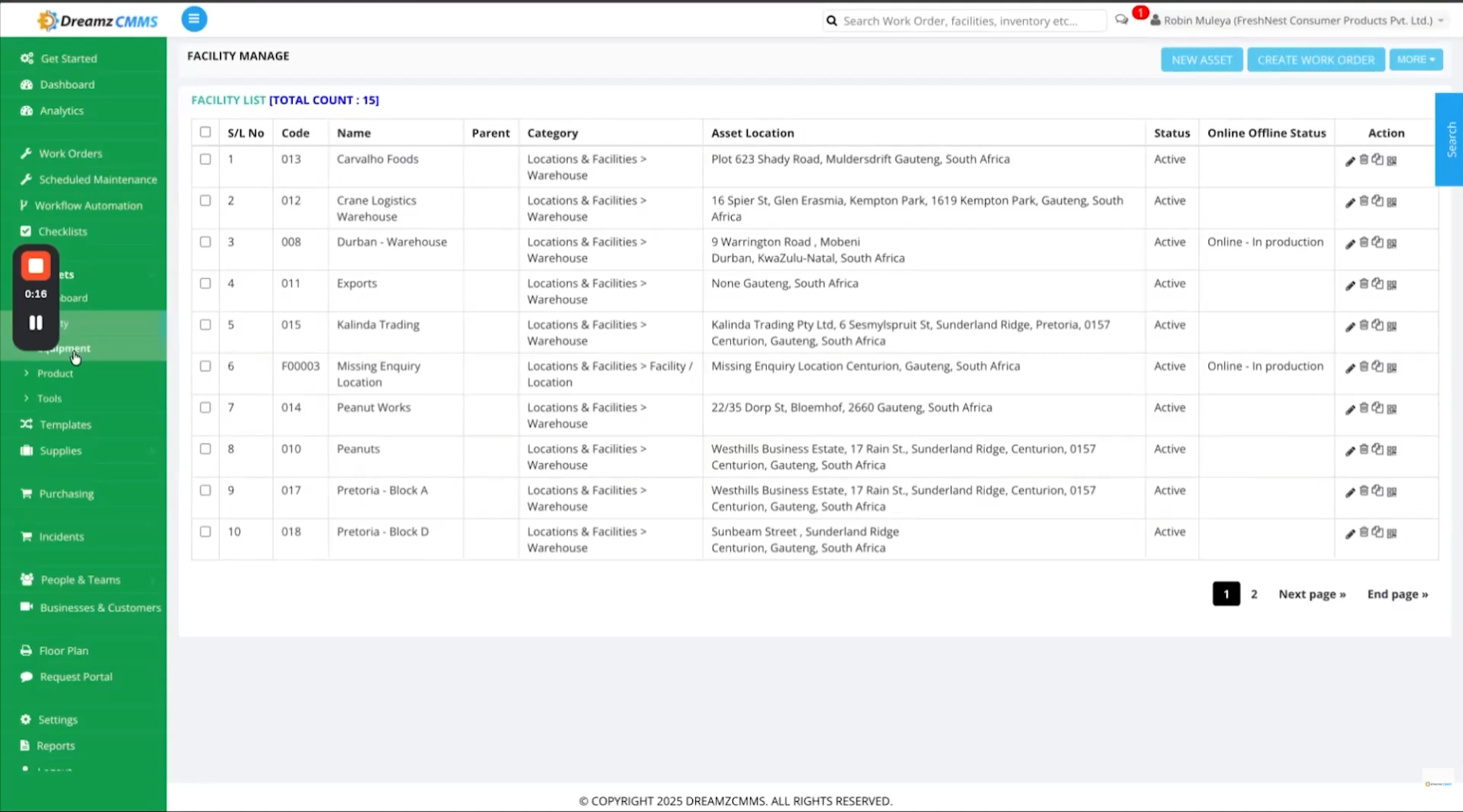
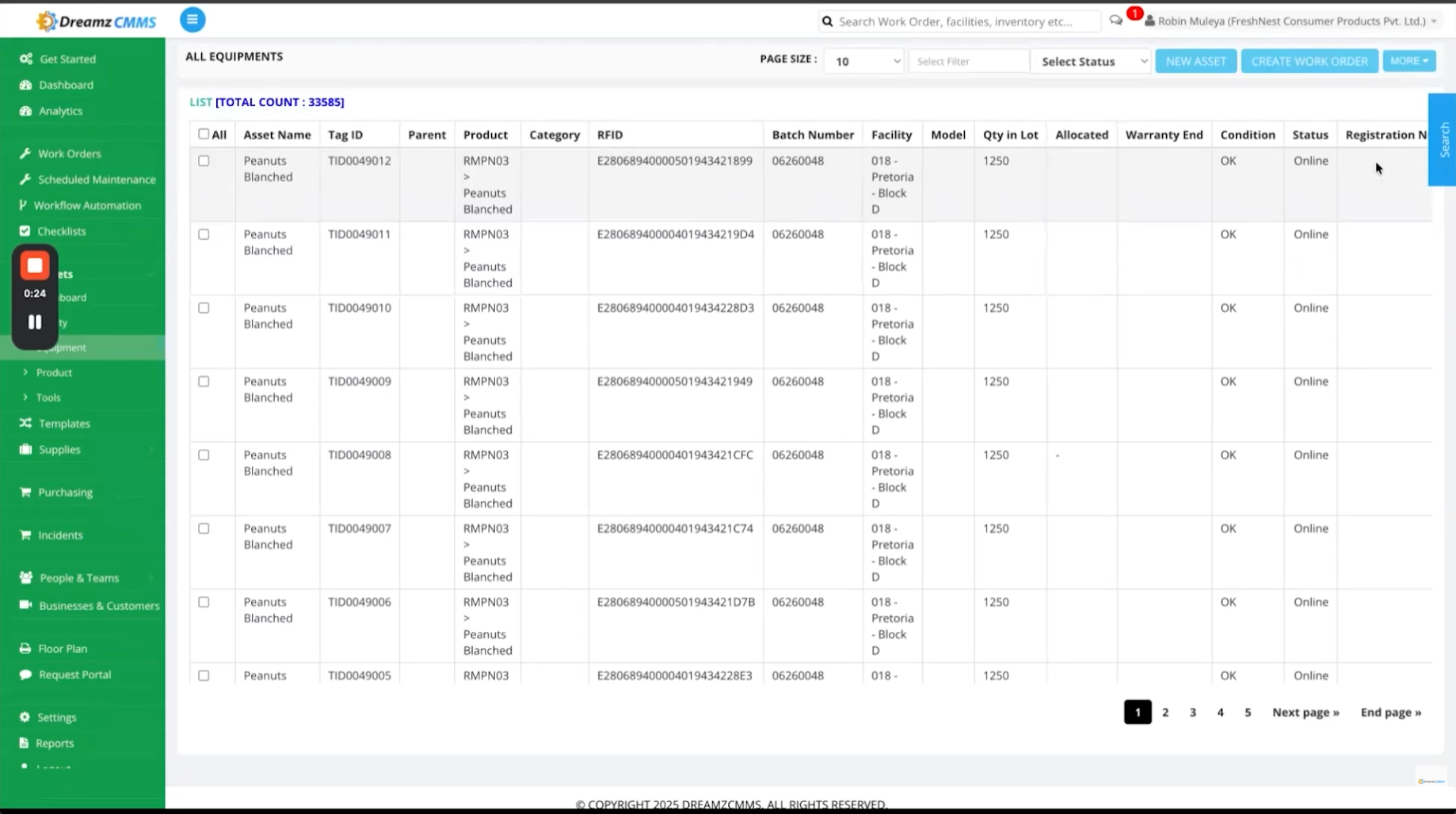
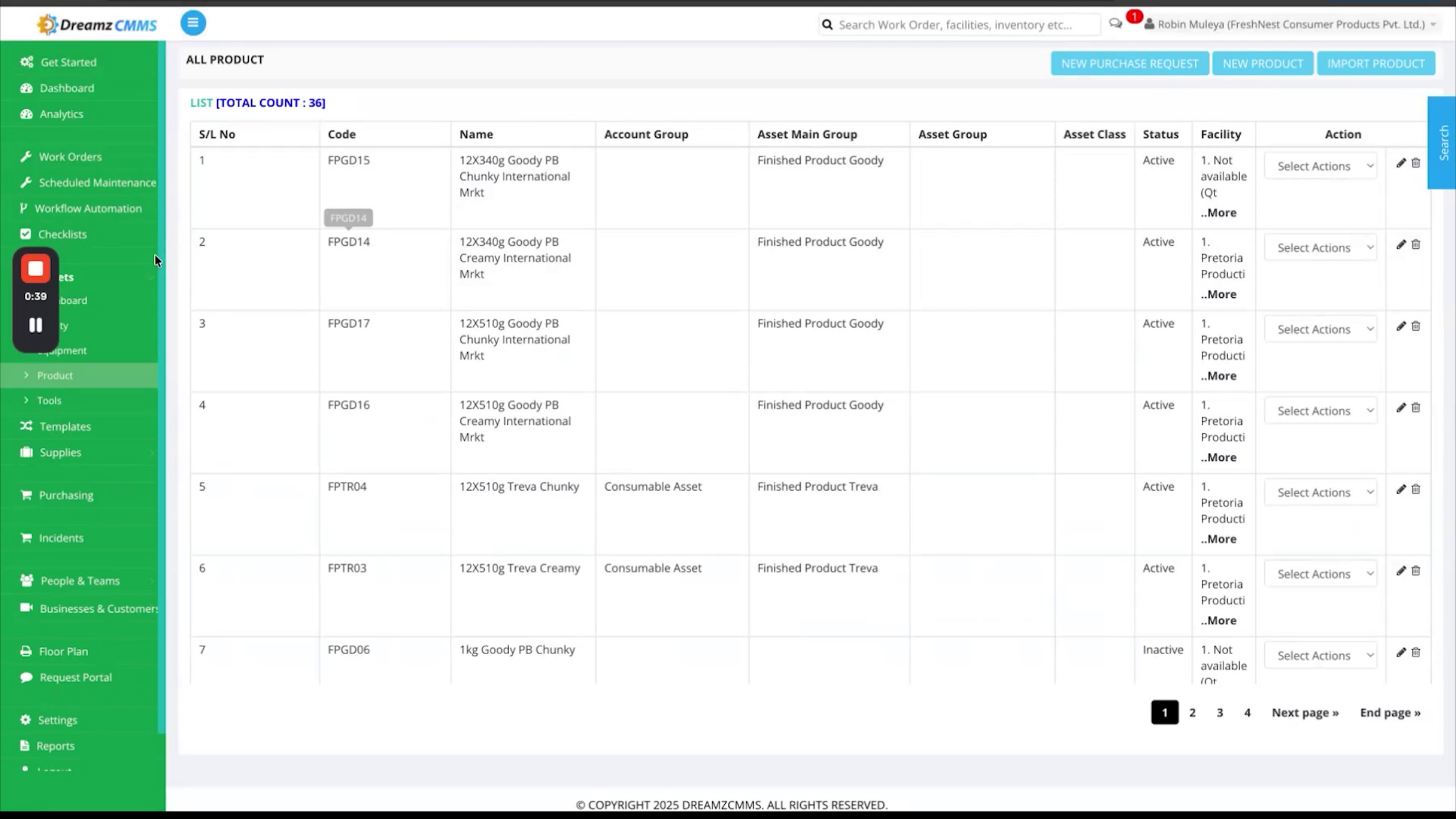
Everything you use in the mobile app is backed by master data in the web portal. The Facility module lists every plant, warehouse, and production area across your organization. The Equipment module maintains a registry of every tagged asset, including its serial number, parent product, assigned facility, and current status. The Product module contains your complete catalog of SKUs and packaging types.
Step 2 – Audit Every Scan by Facility
Every action performed in the mobile app is recorded here in the web portal, giving you a complete audit trail. The FacilityWise scan report shows every RFID or QR code scan by location, including the asset details, scan time, the user who performed the scan, and the verification status — making it easy to verify inventory, identify missing or misplaced items, and maintain an accurate record for each location.
Step 3 – Verify Dispatches Against Receipts
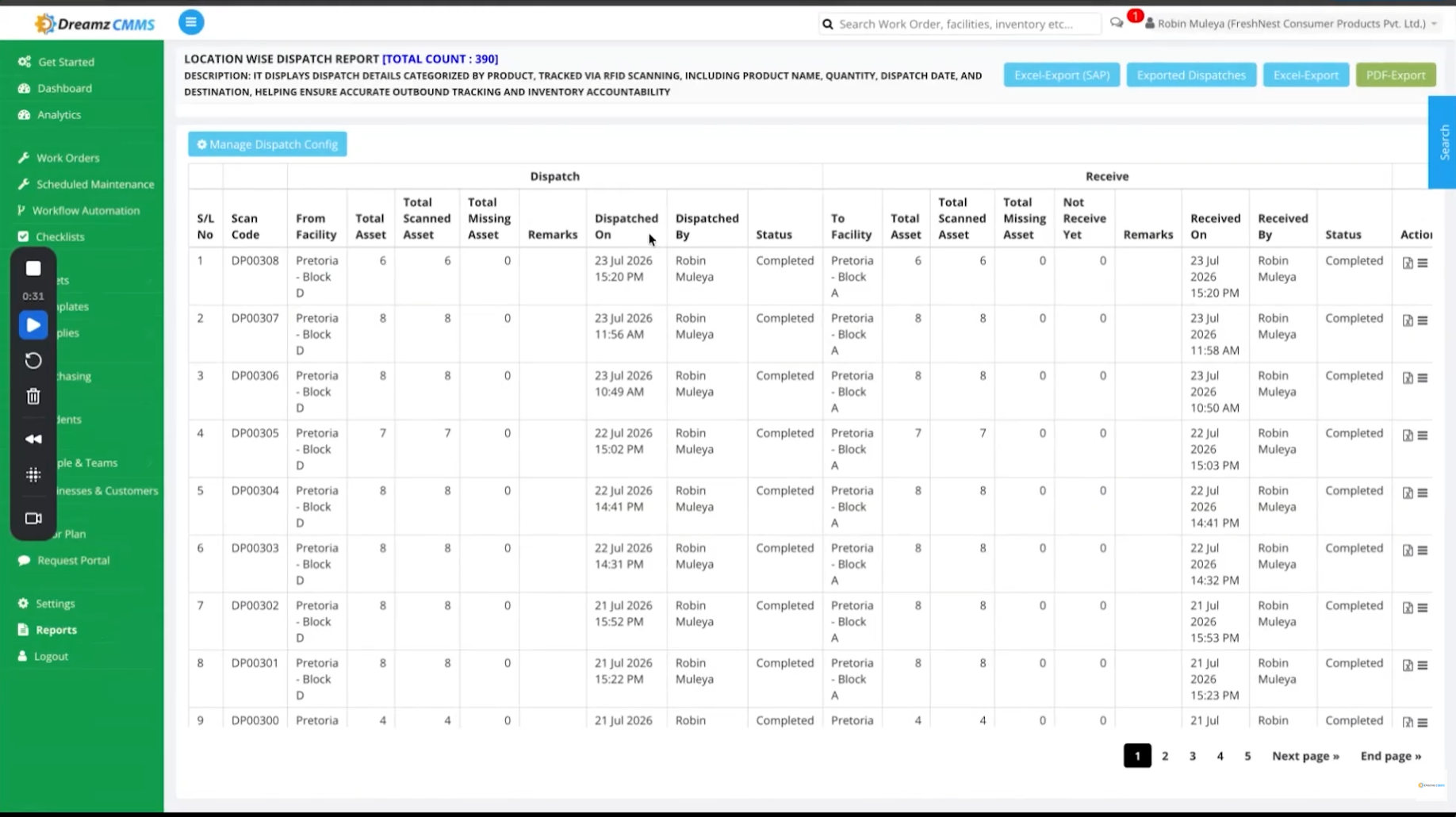
The LocationWise report shows dispatch and receiving records side-by-side for every shipment. You can compare the product, quantity, and scanned count at dispatch with the scanned count received at the destination, helping you verify that every transfer is complete and accurate.
Note: The portal also provides dedicated exports for SAP and completed dispatch records, making it easy to integrate inventory data with your existing business systems.
Step 4 – Review Inventory Enquiry Reports
The LocationWise Enquiry Report summarizes every stock check by location. It shows the total assets in each facility, verified assets, missing assets, and any additional assets found at that location — helping management analyze inventory across facilities and prioritize follow-up where needed. The Enquiry Summary Report provides the same information in a consolidated view across all locations, and includes an asset verification export for more detailed analysis.
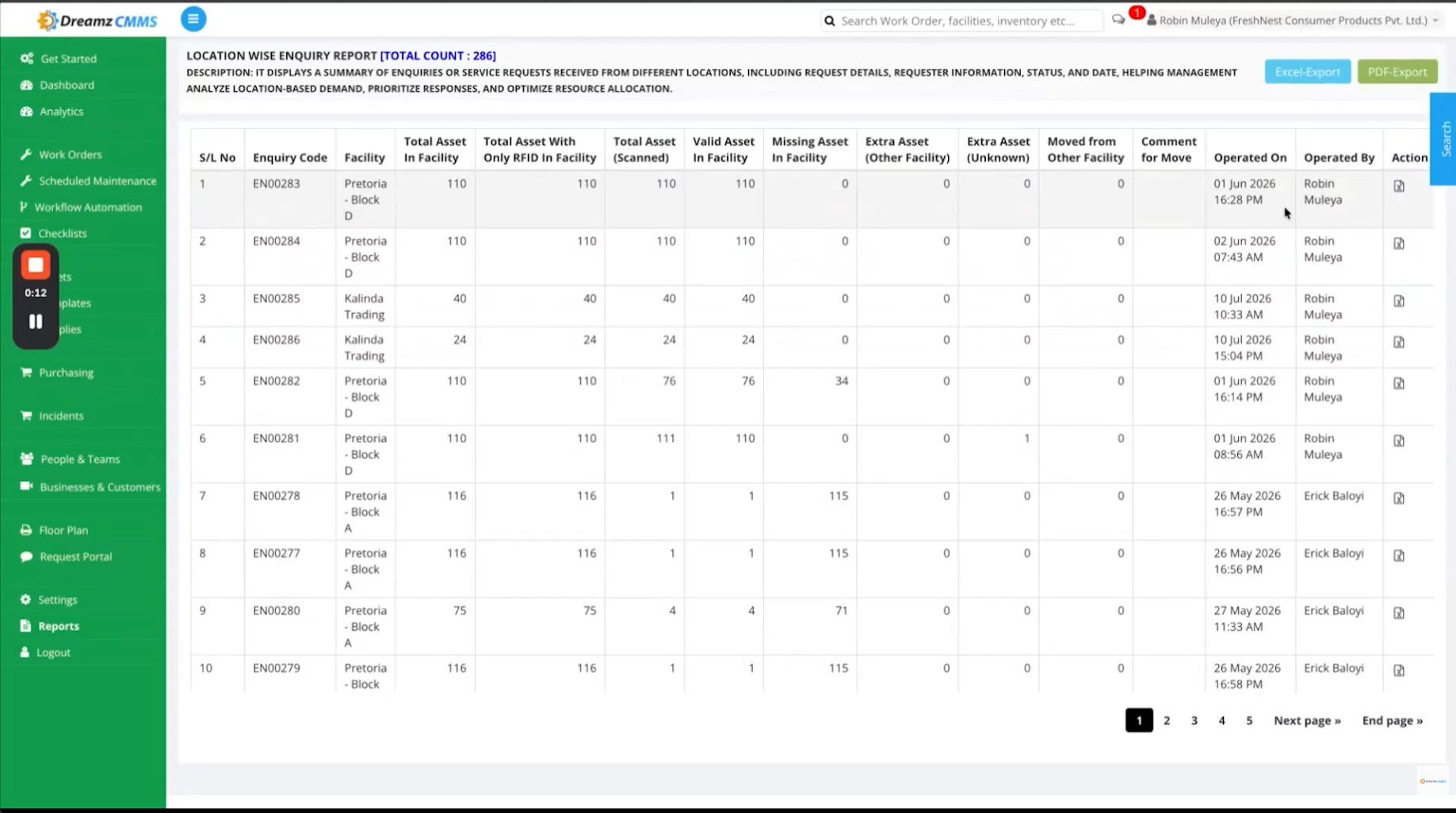
Step 5 – Export Your Reports
All reports can be exported directly to Excel or PDF, giving finance, quality, and operations teams a clean handoff without re-keying any data.
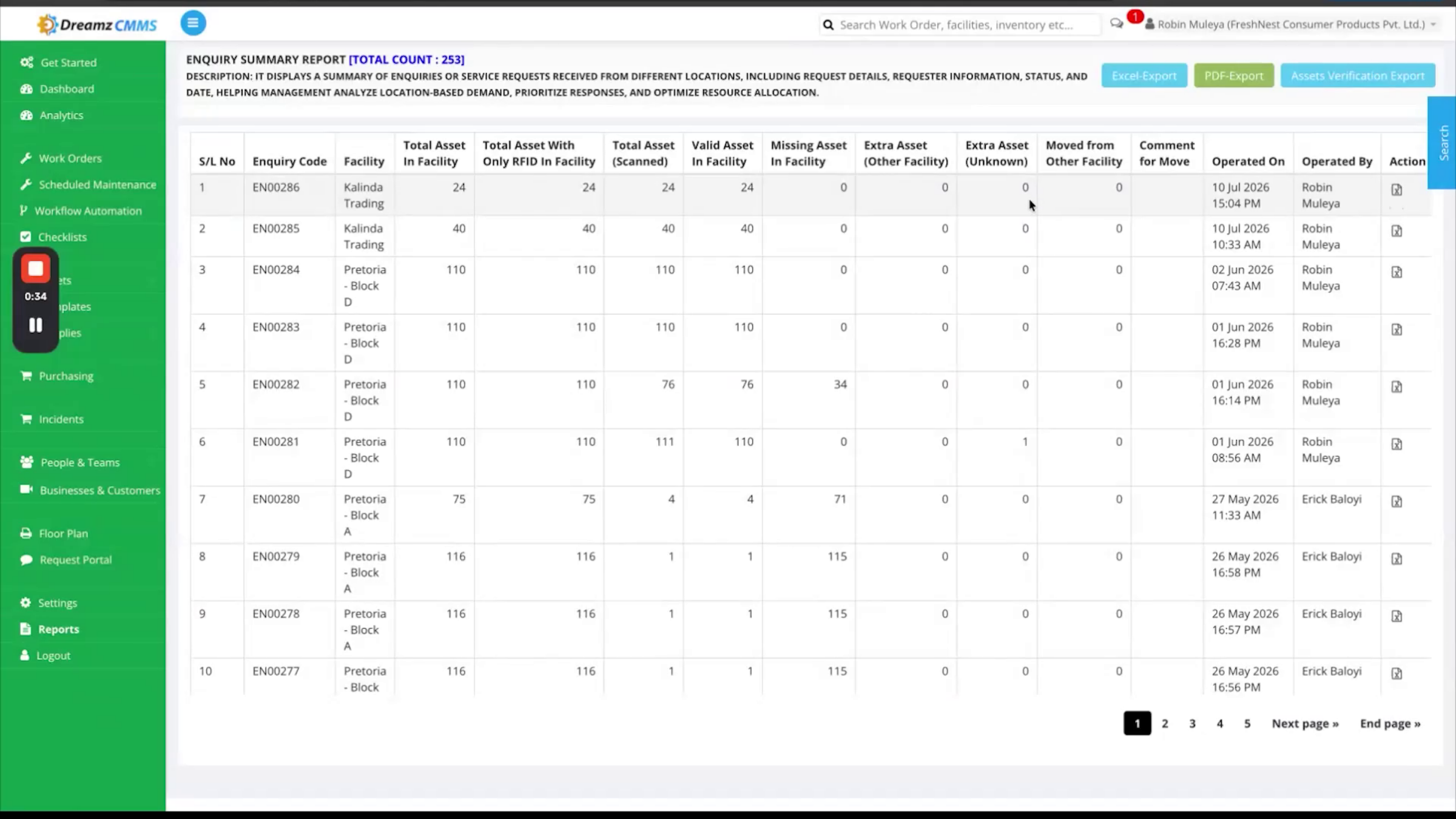
After Setup — What's Next?
With master data in place and reports flowing in from every scan and shipment, your management team has a complete, tamper-proof record of every product from registration to shipment. Once you're comfortable with the core workflow, you can:
- Set up recurring exports of key reports to Excel or PDF for quality, operations, and finance teams.
- Use the SAP and completed dispatch record exports to keep inventory data in sync with your existing business systems.
- Review the LocationWise Enquiry Report regularly to catch missing or misplaced assets before they become a bigger problem.
Ready to see the DreamzCMMSRFID web portal in action with your own team? Contact DreamzTech to schedule a personalized demonstration.
Tips for Plant Management Teams
- Keep Facility, Equipment, and Product master data current before a rollout — every report in the portal is built on top of these records.
- Check the LocationWise dispatch and receiving comparison after any shipment to catch quantity mismatches early.
- Use the SAP export option for dispatches if your finance or ERP team already reconciles inventory in SAP.
- Run the Enquiry Summary Report across locations periodically to catch assets appearing somewhere they shouldn't.
Frequently Asked Questions
What's recorded in the FacilityWise scan report?
It shows every RFID or QR code scan by location, including the asset details, scan time, the user who performed the scan, and the verification status.
How do I know if a shipment arrived with the right quantity?
The LocationWise report compares the scanned count at dispatch with the scanned count received at the destination, so you can quickly confirm every transfer is complete and accurate.
Can I export reports for my ERP or finance team?
Yes. All reports export to Excel or PDF, and the portal also provides dedicated exports for SAP and completed dispatch records.
What's the difference between the LocationWise Enquiry Report and the Enquiry Summary Report?
The LocationWise Enquiry Report summarizes stock checks facility by facility, while the Enquiry Summary Report consolidates that same information across all locations in a single view.