All Reports – Maintenance Reports
The Maintenance Reports section within All Reports in DreamzCMMS provides a comprehensive set of reports to help you analyse work order activity, track KPIs, monitor backlogs, and review scheduler and checklist performance. These reports give maintenance teams and managers the insights needed to keep operations running efficiently. Key highlights include:
- View all work orders and jobs with their status using the Maintenance Report
- Monitor performance with the KPI Dashboard Report
- Visualise workload trends using the Work Order Count Chart
- Identify outstanding tasks with the Work Order Backlog Report
- Review scheduling and checklist completion using Scheduler Reports and Checklist Work Order Reports
Overview
The Maintenance Reports in DreamzCMMS are accessible from the All Reports page within the Reports menu. The section begins with the Maintenance Report, which provides a comprehensive view of all work orders and jobs created in the system along with their current status and other relevant details. Beyond this foundational report, users can also access the KPI Dashboard Report for performance monitoring, the Work Order Count Chart for trend visualisation, the Work Order Backlog Report for identifying outstanding tasks, Scheduler Reports for planned maintenance insights, and Checklist Work Order Reports for compliance and task completion tracking.
Here is a reference video:
Step by Step Description to Access Maintenance Reports
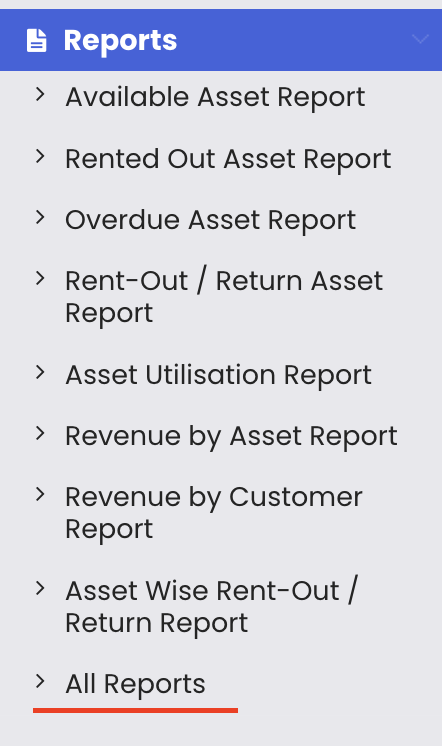
Step 1 – Navigate to All Reports
Click on Reports from the left-hand menu and select "All Reports." This opens the centralised reports library page.
Step 2 – Locate the Maintenance Reports Section
On the All Reports page, the Maintenance Report is one of the first reports visible. This is the primary report for viewing all work orders and jobs created in the system.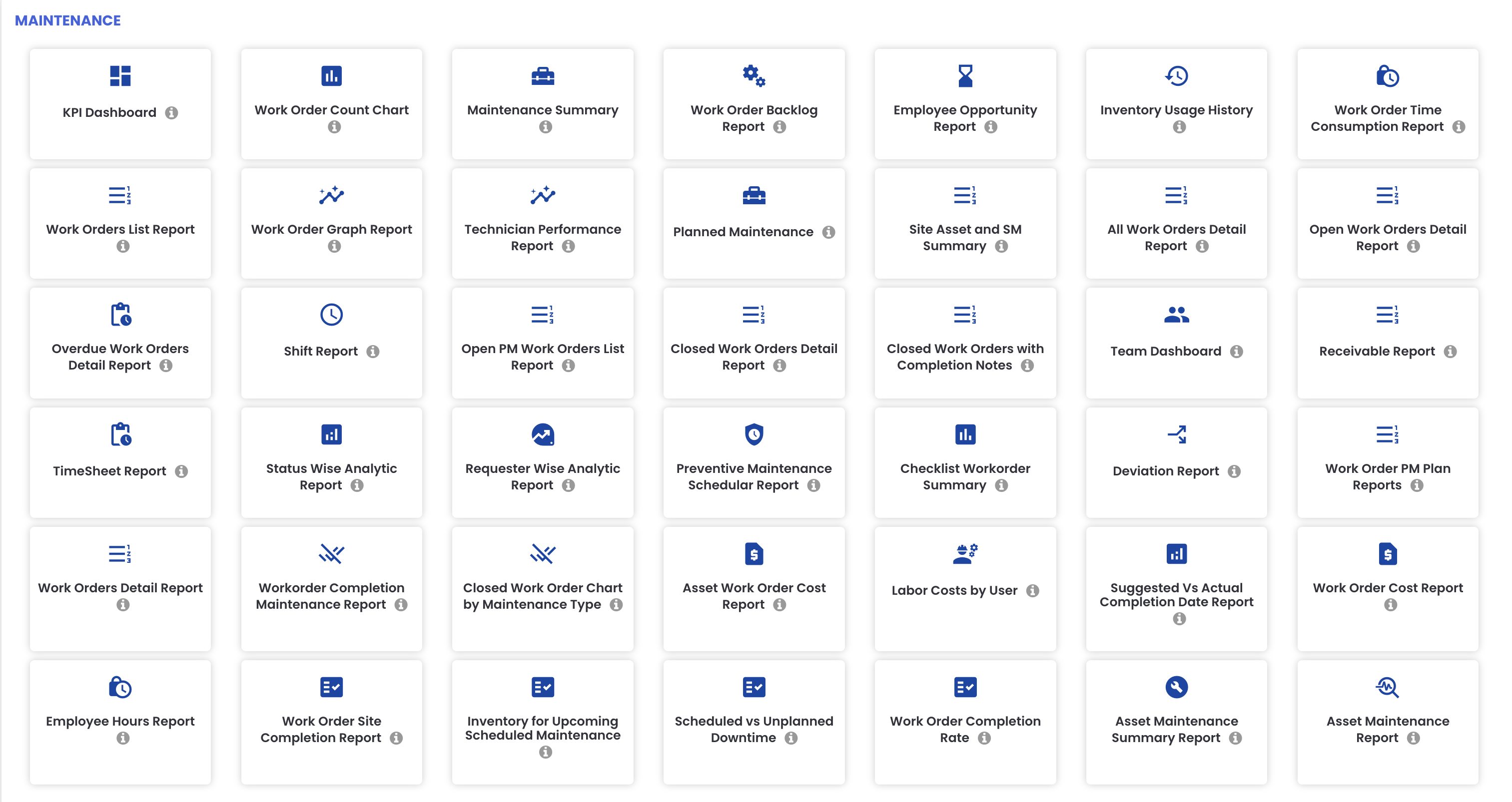
Step 3 – Review the Maintenance Report
Click on the Maintenance Report to view all work orders and jobs that have been created, along with their current status and other relevant details such as assignee, priority, and dates.
Step 4 – Access Additional Maintenance Reports
In addition to the Maintenance Report, the following reports are also available in this section:
- KPI Dashboard Report – monitor key performance indicators for your maintenance operations
- Work Order Count Chart – visualise work order volumes and trends over time
- Work Order Backlog Report – identify outstanding or overdue work orders that have not yet been completed
- Scheduler Reports – review planned and scheduled maintenance activity
- Checklist Work Order Reports – track checklist completion rates within work orders
Step 5 – Open and Use a Report
Click on any maintenance report to open it. Each report will display the relevant data and may include export options such as Excel or PDF download.
Tips for Using Maintenance Reports
- Run the Maintenance Report at the start of each day to review all open work orders and their statuses, ensuring nothing is missed or left unactioned.
- Use the KPI Dashboard Report in weekly or monthly management meetings to present a data-driven summary of maintenance team performance.
- Monitor the Work Order Backlog Report regularly to identify any accumulation of unresolved tasks and reallocate resources before backlogs become unmanageable.
- Use the Work Order Count Chart to spot seasonal trends or spikes in maintenance demand and plan staffing and resources accordingly.
- Review the Checklist Work Order Reports to ensure technicians are completing all required checklist steps within each work order, maintaining quality and compliance standards.
Frequently Asked Questions
Where can I find Maintenance Reports in DreamzCMMS?
Maintenance Reports are accessible from the All Reports page. Click on "Reports" from the left-hand menu and select "All Reports." The Maintenance Report and related reports are listed at the top of the page.
What does the Maintenance Report show?
The Maintenance Report provides a comprehensive view of all work orders and jobs created in the system, including their current status and other relevant details such as assignee, dates, and priority.
What is the Work Order Backlog Report used for?
The Work Order Backlog Report identifies work orders that are outstanding or have not yet been completed, helping managers track unresolved tasks and take action to clear the backlog.
What does the KPI Dashboard Report include?
The KPI Dashboard Report provides key performance indicators for your maintenance operations, allowing managers to assess team performance, response times, and overall maintenance efficiency at a glance.
What are Checklist Work Order Reports?
Checklist Work Order Reports track the completion of checklists within work orders, helping managers verify that all required steps have been completed by technicians during maintenance tasks.
Related Articles
- All Reports – RFID Asset Tracking Reports
- All Reports – Inventory Reports
- All Reports – Rental Reports and Category Filter
- Creating and Managing Work Orders
- Schedule – Create a Quick Job or Work Order