All Reports – RFID Asset Tracking Reports
The All Reports section in DreamzCMMS Asset Rentals provides a centralised library of every report available in the system, organised by category. Under the RFID Asset Tracking category, you can access a range of reports that help you track and manage assets using RFID data — from dispatch and serialization to asset movement tracking. Key highlights include:
- Access the complete list of system reports from a single All Reports page
- Browse reports across categories including RFID Asset Tracking, Rental and Stock Reports, and more
- View the Location-Wise Dispatch Report to track dispatches by location
- Access the Dispatch Report showing locations where dispatches have been created
- Use the Asset Bulk Serialization Report and Asset Move-Out Report for detailed RFID asset tracking
Overview
The All Reports page in DreamzCMMS is accessible from the Reports menu and serves as a comprehensive library of all reports available in the Asset Rentals module. Reports are organised into clearly defined categories, making it easy to navigate to the reports most relevant to your role or task. One of the key categories available is RFID Asset Tracking, which contains reports designed to help teams monitor asset locations, track dispatch activity, manage bulk serialization, and record asset movement — all leveraging RFID data for accurate, real-time asset visibility.
Here is a reference video:
Step by Step Description to Access RFID Asset Tracking Reports
Step 1 – Navigate to All Reports
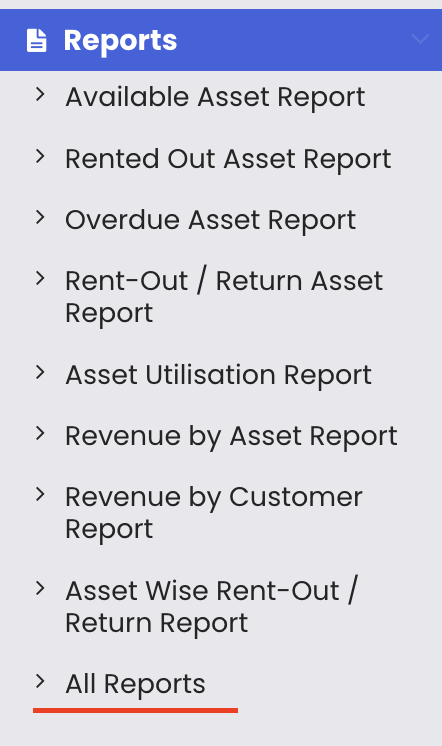
Click on Reports from the left-hand side menu and then select "All Reports." This will open the centralised reports library page.
Step 2 – Scroll to View All Report Categories
Scroll down the All Reports page to browse the full list of available reports. Reports are grouped into categories such as RFID Asset Tracking, Rental and Stock Reports, and other related report types.
Step 3 – Locate the RFID Asset Tracking Category
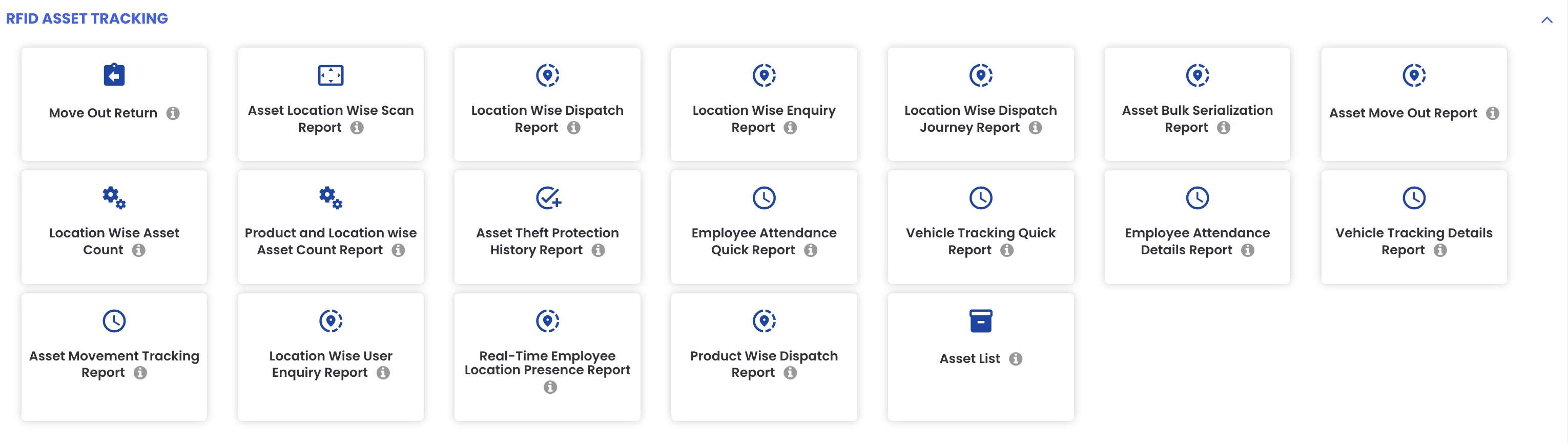
Find the RFID Asset Tracking section on the All Reports page. This category contains reports specifically designed for tracking and managing assets using RFID data.
Step 4 – Access the Available RFID Reports
Under the RFID Asset Tracking category, you will find the following reports:
- Location-Wise Dispatch Report – track dispatches organised by location
- Dispatch Report – view all locations where dispatches have been created
- Asset Bulk Serialization Report – manage and review bulk serialization of assets
- Asset Move-Out Report – track assets that have been moved out
- Other related RFID asset tracking reports
Step 5 – Open and Use a Report
Click on any report from the RFID Asset Tracking category to open it. Each report will display the relevant asset tracking data and provide export options where available.
Tips for Using RFID Asset Tracking Reports
- Use the Location-Wise Dispatch Report to get a site-by-site view of all dispatched assets, making it easier to track where your assets are at any given time.
- Run the Dispatch Report regularly to ensure all dispatch activity is accurately recorded and no movements have been missed in the system.
- Use the Asset Bulk Serialization Report when onboarding large batches of new assets to verify that all items have been correctly serialized and registered in the system.
- Review the Asset Move-Out Report to maintain an accurate record of all assets that have left a facility, which is essential for accountability and loss prevention.
- Bookmark the All Reports page for quick access, as it provides a single point of entry to all reports across every category in the system.
Frequently Asked Questions
What is the All Reports page in DreamzCMMS?
The All Reports page is a centralised library that lists every report available in the Asset Rentals module, organised by category. You can access it by clicking on "Reports" from the left-hand menu and selecting "All Reports."
What types of reports are available under RFID Asset Tracking?
The RFID Asset Tracking category includes the Location-Wise Dispatch Report, Dispatch Report, Asset Bulk Serialization Report, Asset Move-Out Report, and other related reports that help track and manage assets using RFID data.
What does the Location-Wise Dispatch Report show?
The Location-Wise Dispatch Report displays dispatch activity organised by location, giving you a clear view of which assets have been dispatched from or to each site.
What is the Asset Move-Out Report used for?
The Asset Move-Out Report tracks all assets that have been moved out of a facility or location, providing a log of asset movements for accountability and audit purposes.
Are there other report categories besides RFID Asset Tracking on the All Reports page?
Yes. The All Reports page includes multiple categories such as Rental and Stock Reports, Inventory Reports, Maintenance Reports, and others. You can scroll through the page to browse all available categories and their reports.
Related Articles
- All Reports – Inventory Reports
- All Reports – Maintenance Reports
- All Reports – Rental Reports and Category Filter
- Available Asset Report
- Rental Dashboard Overview