Available Asset Report
The Available Asset Report in DreamzCMMS Asset Rentals gives you a real-time overview of all assets that are currently available for rental. It is a quick and effective way to understand your fleet's availability at any given time and supports data export for further analysis or sharing. Key highlights include:
- View all assets that are currently available for rental
- Get a clear overview of asset availability across your system
- Export the report in Excel format for further analysis
- Export the report as a PDF for sharing or record-keeping
Overview
The Available Asset Report is accessible from the Reports menu within the Asset Rentals module in DreamzCMMS. It provides users with an instant view of which assets in their fleet are currently free and available for new rental bookings. This report is particularly useful for operations teams who need to quickly identify available inventory before confirming a customer booking. The report supports both Excel and PDF export options, making it easy to share or archive the data as needed.
Here is a reference video:
Step by Step Description to View the Available Asset Report
Step 1 – Navigate to Reports
Click on Reports from the left-hand side menu to access the reports section of the Asset Rentals module.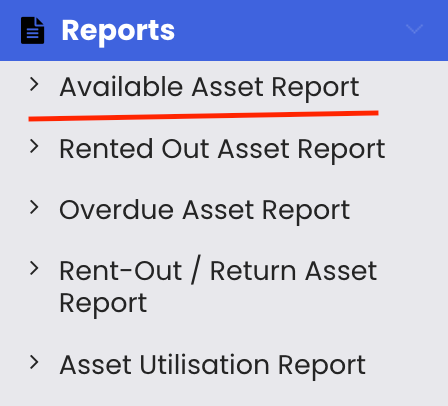
Step 2 – Select the Available Asset Report
From the reports list, select "Available Asset Report." The report will load and display all assets that are currently available in your system.
Step 3 – Review Asset Availability
The report provides a clear overview of all assets with an available rental status, helping you quickly identify which assets can be allocated to new bookings without conflicts.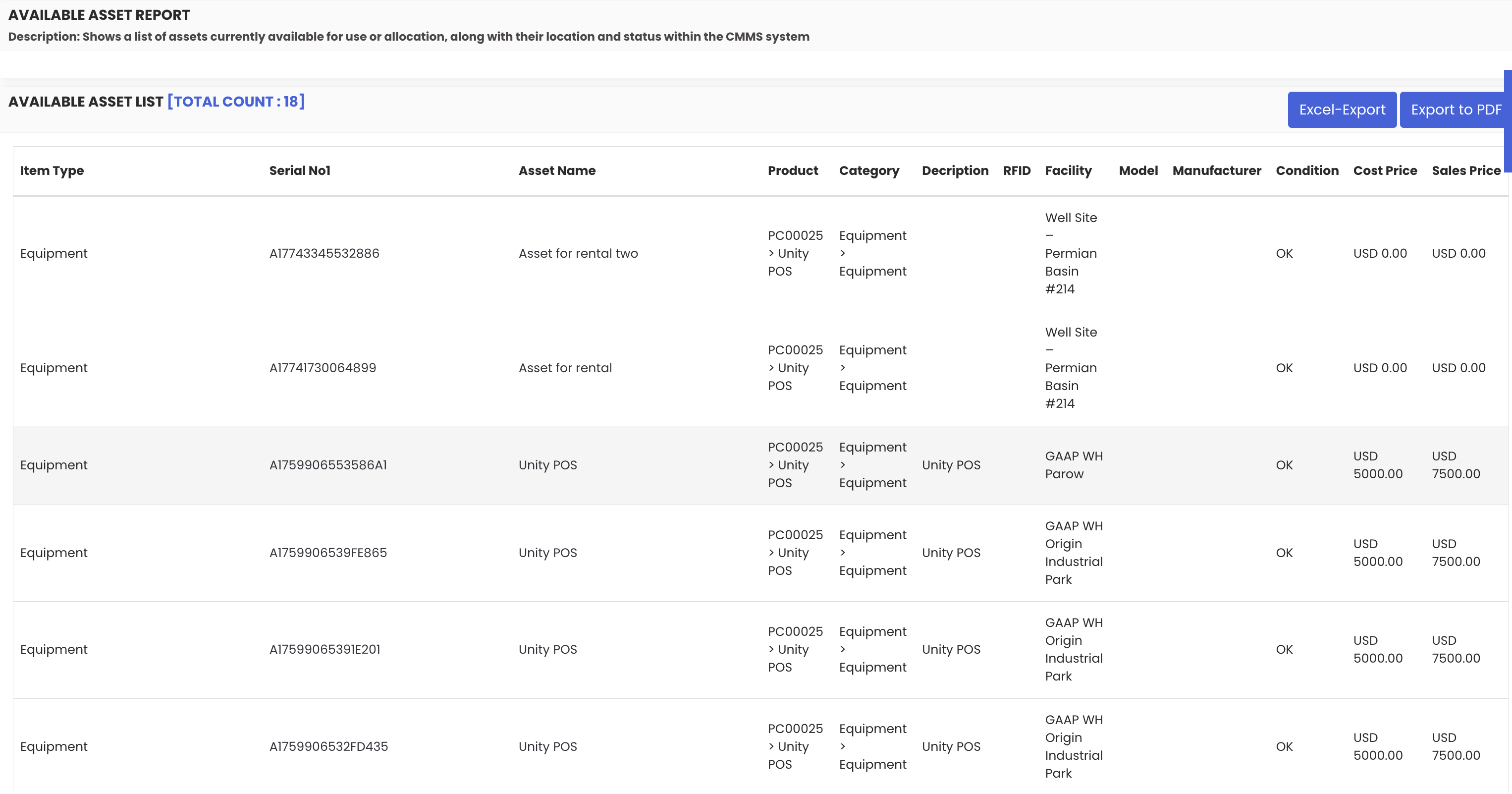
Step 4 – Export the Report
Use the available export options to save or share the report:
- Excel export – download the report data as a spreadsheet for further analysis
- PDF export – export the report as a PDF for sharing or archiving

Tips for Using the Available Asset Report
- Run the Available Asset Report before confirming a new rental booking to verify that the required asset is free and not already allocated.
- Use the Excel export to analyse availability trends over time or share the data with your sales or operations team for planning purposes.
- Cross-reference this report with the Availability Calendar to get both a current availability snapshot and a forward-looking timeline of upcoming bookings.
- Review the report regularly to monitor fleet utilisation — a consistently high number of available assets may indicate an opportunity to improve rental volumes.
- Use the PDF export to create a quick reference document for customer-facing teams who need to confirm asset availability during enquiries.
Frequently Asked Questions
What does the Available Asset Report show?
The Available Asset Report displays all assets in your system that are currently available for rental, giving you a real-time snapshot of which assets can be allocated to new bookings.
How do I access the Available Asset Report?
Click on "Reports" from the left-hand side menu in the Asset Rentals module and select "Available Asset Report" from the list of available reports.
Can I export the Available Asset Report?
Yes. The report supports both Excel and PDF export options, allowing you to download or share the availability data as needed.
How is this report different from the Rental Availability List?
The Available Asset Report is a dedicated reporting view focused specifically on currently available assets, with export capabilities. The Rental Availability List in the Equipment module is an operational view that allows you to filter by rental state and edit asset records directly.
How often is the data in this report updated?
The Available Asset Report reflects real-time data from your system, so the availability status shown is current at the time the report is generated.
Related Articles
- Rented-Out Asset Report
- Overdue Asset Report
- Asset Utilization Report
- Rental Availability List
- Availability Calendar – Asset Rentals