Rental Availability List
The Rental Availability List in DreamzCMMS provides a quick and filterable view of the current rental status of all assets in your fleet. It allows you to instantly see which assets are available, which are rented out, and which are in other rental states — making it an essential tool for managing day-to-day asset allocation and availability. Key highlights include:
- View the current rental status of all assets in one consolidated list
- Filter assets by rental state such as Available or Rented Out
- Use the rental search to locate specific assets quickly
- View or edit any asset record directly from the list
- Efficiently track asset allocation across your entire rental fleet
Overview
The Rental Availability List in DreamzCMMS is accessible from the Equipment menu and provides a real-time, filterable list of all assets and their current rental states. Users can see at a glance which assets are available for new bookings and which are currently rented out or in other states. The built-in search and rental state filter make it easy to narrow down the list to a specific subset of assets — for example, viewing only assets that are currently rented out. From the list, users can also directly open and edit any asset record, making it a practical tool for both tracking and managing the rental fleet.
Here is a reference video:
Step by Step Description to Use the Rental Availability List
Step 1 – Navigate to the Rental Availability List
Click on Equipment from the left-hand menu, then go to Availability List and select Rental Availability List. This will open the full list of assets with their current rental status.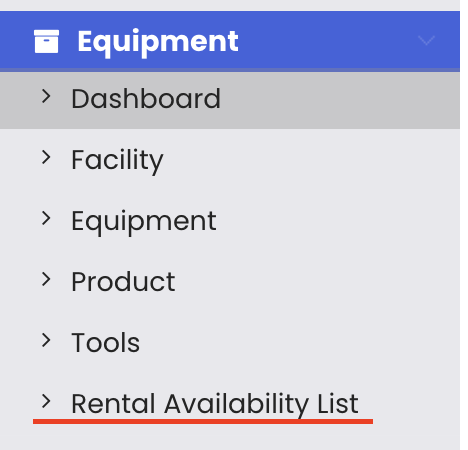
Step 2 – View Current Rental Status of All Assets
The list displays all assets along with their current rental state. You can see at a glance which assets are available for new bookings and which are in other states such as Rented Out or Booked.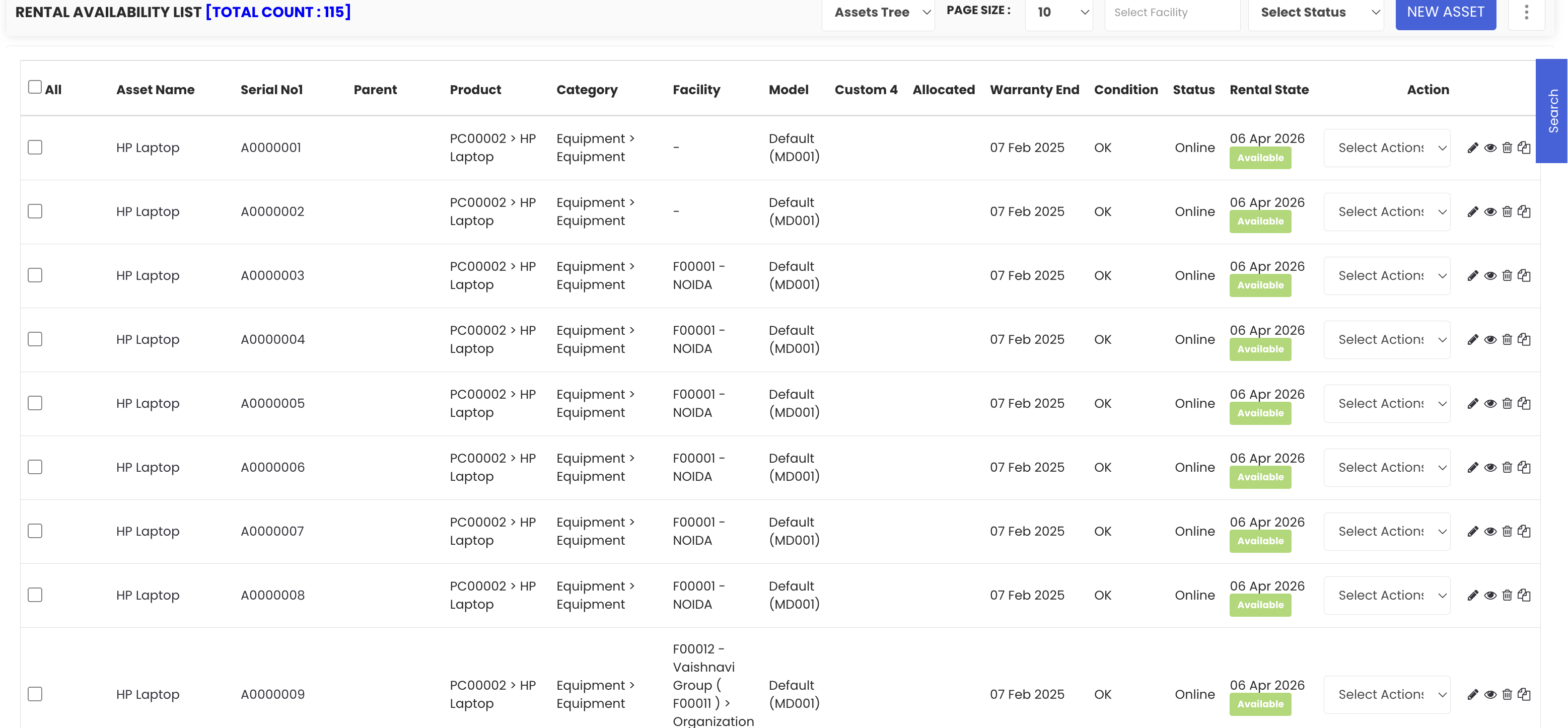
Step 3 – Search and Filter by Rental State
Use the rental search field to find a specific asset by name or ID. To narrow the list further, use the rental state filter to display only assets in a particular state. For example, select "Rented Out" to view only the assets that are currently on rent.
Step 4 – View or Edit an Asset
From the Rental Availability List, you can directly view or edit any asset record without navigating away from the list. Click on the relevant action option next to the asset to open its details or make updates as needed.
Tips for Using the Rental Availability List
- Use the rental state filter at the start of each day to quickly identify which assets are available for new bookings and which are still out on rent.
- Combine the search and filter options together to locate a specific asset within a particular rental state, especially useful when managing a large fleet.
- Use the edit option directly from the list to update asset details quickly without having to navigate through multiple menus.
- Cross-reference the Rental Availability List with the Availability Calendar to get both a current status view and a forward-looking timeline of asset bookings.
- Regularly review assets showing a "Rented Out" status to ensure returns are being processed on time and availability records are kept up to date.
Frequently Asked Questions
What is the Rental Availability List and where do I find it?
The Rental Availability List is a filterable view of all assets and their current rental states in DreamzCMMS. You can access it by clicking on "Equipment" from the left-hand menu, then selecting "Availability List" and "Rental Availability List."
What rental states can I filter by?
You can filter assets by rental states such as Available, Rented Out, and Booked, allowing you to quickly view only the assets that match the status you are looking for.
Can I search for a specific asset within the list?
Yes. The Rental Availability List includes a rental search field that allows you to search for a specific asset by name or ID, making it easy to locate a particular asset without scrolling through the full list.
Can I edit an asset directly from the Rental Availability List?
Yes. Each asset in the list has view and edit options that allow you to open and update the asset record directly from the list, without needing to navigate to a separate section.
How does the Rental Availability List differ from the Availability Calendar?
The Rental Availability List shows the current rental status of all assets in a list format and allows filtering by state, making it ideal for quick status checks. The Availability Calendar, on the other hand, provides a Gantt chart timeline view of bookings across dates, which is better suited for scheduling and planning future rentals.
Related Articles
- Rental Dashboard Overview
- Availability Calendar – Asset Rentals
- Equipment Dashboard
- Rental Return
- How to Manage Assets in DreamzCMMS