Availability Calendar – Asset Rentals
The Availability Calendar in DreamzCMMS Asset Rentals provides a visual Gantt chart timeline of all asset bookings, giving you a clear picture of when each asset is rented, by whom, and for how long. It is a powerful planning tool that helps rental teams manage scheduling and avoid double-bookings. Key highlights include:
- View asset bookings in an intuitive Gantt chart timeline
- See who an asset is booked for and the associated booking details
- Track rent-out dates, return-by dates, and rental duration
- Monitor the status of each booking at a glance
- Quickly identify free windows for new rentals across your asset fleet
Overview
The Availability Calendar in DreamzCMMS Asset Rentals is accessible from the Manage Rentals module and presents asset booking information in a visual Gantt chart format. Each asset's rental timeline is displayed horizontally across dates, allowing users to instantly see when an asset is occupied, who it is booked for, and key rental details such as the rent-out date, return-by date, duration, and current status. This view is essential for effective scheduling, capacity planning, and ensuring optimal asset utilisation.
Here is a reference video:
Step by Step Description to Use the Availability Calendar
Step 1 – Navigate to Manage Rentals
After logging into DreamzCMMS, click on Manage Rentals from the left-hand menu to access the rental module.
Step 2 – Open the Availability Calendar
Within the Manage Rentals section, click on Availability Calendar. You will be redirected to the calendar view, which is presented as a Gantt chart timeline.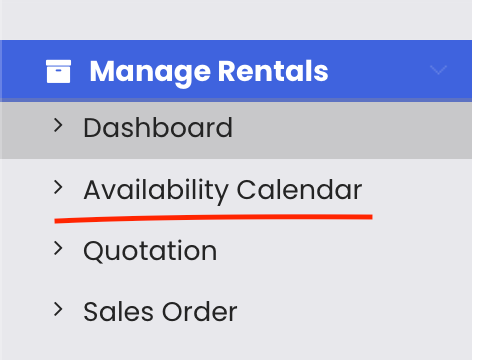
Step 3 – View Asset Booking Timeline
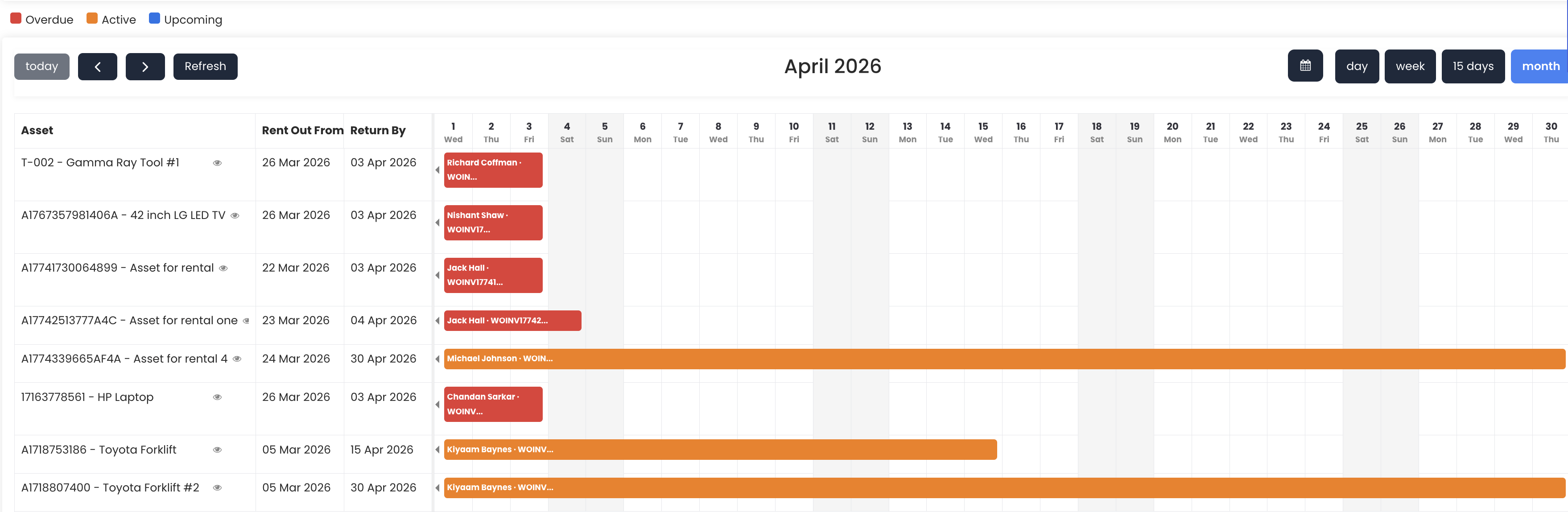
The Gantt chart displays each asset along the left side with its booking timeline stretching across the calendar dates. You can immediately see when each asset is booked and identify any open availability windows.
Step 4 – Review Booking Details
For each booking shown on the chart, you can view the following details:
- Customer name – who the asset is booked for
- Rent-out date – when the rental begins
- Return-by date – when the asset is expected back
- Duration – the total length of the rental period
- Status – the current state of the booking
Tips for Using the Availability Calendar
- Use the Gantt chart view to quickly spot gaps between bookings and identify the best windows to schedule new rentals without conflicts.
- Review the return-by dates regularly to ensure assets are returned on time and can be prepared for the next booking.
- Check the booking status for each entry to differentiate between confirmed rentals, pending bookings, and completed returns.
- Use the calendar at the start of each week to plan asset logistics — such as maintenance windows — by identifying free periods between rentals.
- Cross-reference the Availability Calendar with the Rental Dashboard for a complete picture of both real-time status and scheduled bookings.
Frequently Asked Questions
What is the Availability Calendar in Asset Rentals?
The Availability Calendar is a Gantt chart timeline view within the Manage Rentals module of DreamzCMMS. It shows when each asset is booked, who it is booked for, and key rental details such as rent-out date, return-by date, duration, and status.
How do I access the Availability Calendar?
Click on "Manage Rentals" from the left-hand menu in DreamzCMMS, then select "Availability Calendar" from the sub-menu options. You will be taken directly to the Gantt chart timeline.
What information is shown for each booking on the calendar?
Each booking on the calendar displays the customer name (who the asset is booked for), the rent-out date, the return-by date, the duration of the rental, and the current booking status.
Can I use the calendar to find available assets for a new booking?
Yes. The Gantt chart makes it easy to visually identify gaps between existing bookings, helping you find the right asset with available dates that match a new rental request.
How does the Availability Calendar differ from the Rental Dashboard?
The Rental Dashboard provides a summary of current asset counts and statuses (available, booked, rented out), while the Availability Calendar offers a detailed timeline view of all bookings scheduled across dates, making it more suited for scheduling and planning purposes.
Related Articles
- Rental Dashboard Overview
- Rental Quotation
- Rental Sales Order
- Rental Invoice
- How to Manage Assets in DreamzCMMS