Convert a Lead to a Customer
Once a lead is created, you can convert it to a customer directly from the lead listing page — with the option to simultaneously create an Opportunity, Quotation, or Job in a single step.
Overview
The Convert Lead feature in DreamzFSM allows you to promote a qualified lead into a customer record without leaving the Lead List. When converting, you have four options: convert to customer only, or convert to customer and simultaneously create an Opportunity, a Quotation, or a Job. This streamlined workflow ensures no steps are missed when moving a lead through your pipeline.
Here is a reference video:
Steps to Convert a Lead to a Customer
Step 1 – Open the Lead List and Click Convert
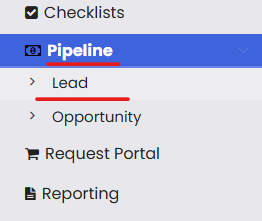
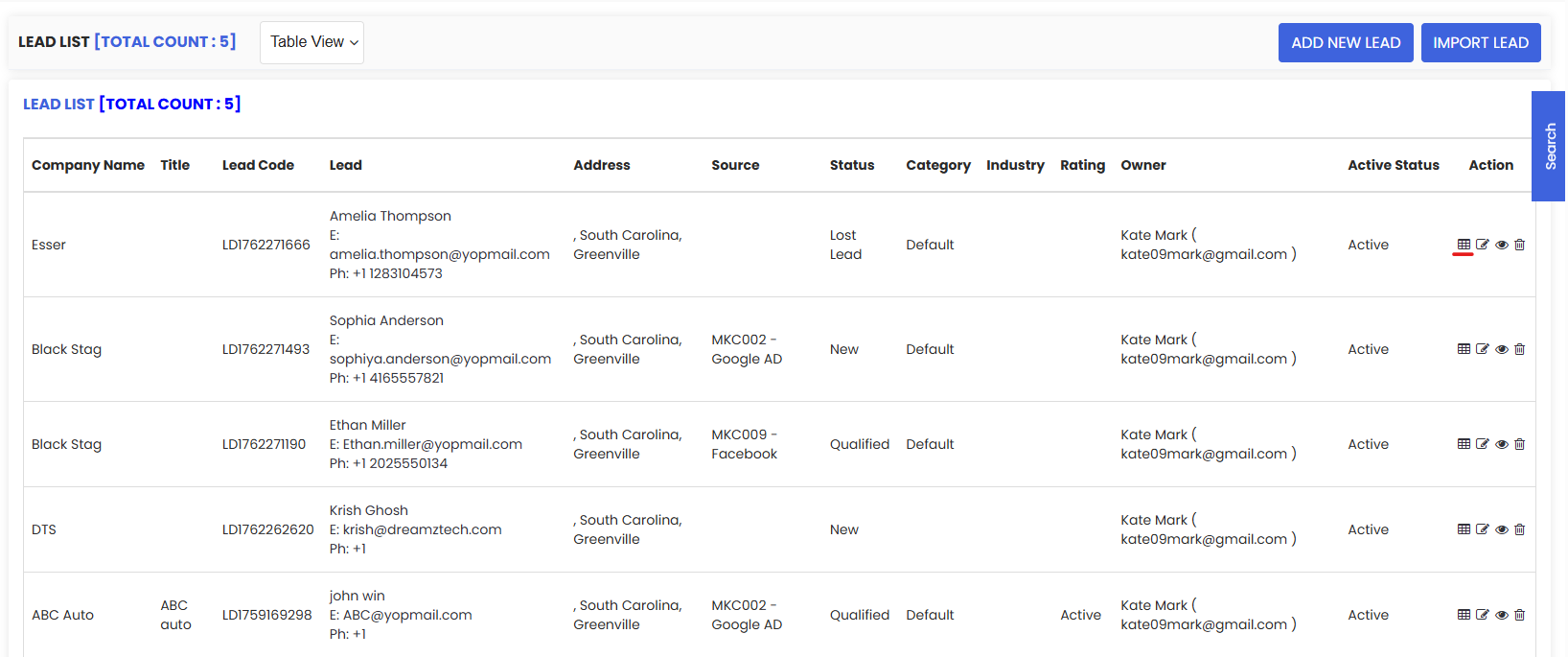
Click on Leads from the Pipeline menu. In the lead listing page, locate the lead you wish to convert. At the rightmost column, find the action buttons and click on Convert.
Step 2 – Select a Conversion Option
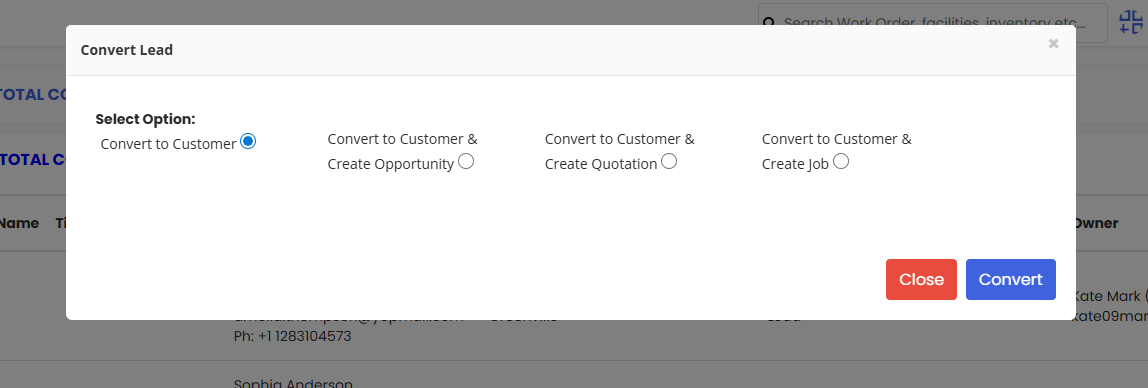
Clicking on Convert Lead will present you with four options:
- Convert to Customer — The lead moves to the Customer List as a new customer record.
- Convert to Customer & Create Opportunity — The lead is added to the Customers list and an Opportunity is simultaneously created.
- Convert to Customer & Create Quotation — The lead is added as a Customer and you can simultaneously create a quotation for that customer and Save.
- Convert to Customer & Create Job — The lead is added as a Customer and you can simultaneously create a job for that customer and Save.
Step 3 – Complete the Conversion and Save
Select the appropriate conversion option based on the next action required. If you chose to create a Quotation or Job alongside the customer, fill in the required details and click Save. The lead will be fully converted and the customer record — along with any associated Opportunity, Quotation, or Job — will be created in the system.
Tips for Converting Leads
- Use Convert to Customer & Create Opportunity when the deal is still in early negotiation — this keeps the prospect in your pipeline for further nurturing and tracking.
- Choose Convert to Customer & Create Quotation when the customer has already expressed interest in a specific service and you are ready to send a formal pricing proposal.
- Use Convert to Customer & Create Job when the deal is already confirmed and work needs to be scheduled immediately after the conversion.
- Only convert leads that are properly qualified — ensure the lead's contact details and company information are complete before converting to avoid incomplete customer records.
- After conversion, verify that the new customer record appears correctly in the Customer List and that any associated Opportunity, Quotation, or Job has been created with the correct details.
Frequently Asked Questions
How do I convert a lead to a customer in DreamzFSM?
From the Lead List, locate the lead you want to convert and click the Convert action icon in the rightmost column. Select one of the four conversion options and complete any required steps, then click Save.
What are the four options available when converting a lead?
You can Convert to Customer, Convert to Customer & Create Opportunity, Convert to Customer & Create Quotation, or Convert to Customer & Create Job. Each option determines what additional records are created alongside the new customer profile.
Where does the lead go after it is converted?
Once converted, the lead moves to the Customer List as a new customer record. Any Opportunity, Quotation, or Job created during the conversion will also be accessible from their respective sections in DreamzFSM.
Can I create a job directly when converting a lead?
Yes. Selecting Convert to Customer & Create Job during the conversion process allows you to fill in job details and save them simultaneously, so work can be scheduled immediately after the lead is converted.
Is the original lead record retained after conversion?
Yes. The original lead record remains in the Lead List and is marked as converted. The new customer record is created separately in the Customer List, maintaining full traceability from lead to customer.