Quickly Assign Technicians to Jobs
If you want to assign one or more jobs to one or more technicians at the same time, DreamzFSM makes this quick and easy through the bulk assign feature in the Job List. Rather than opening each job individually, you can select multiple jobs at once and assign them to the relevant technicians in a single action — saving time and simplifying dispatch.
Overview
The bulk technician assignment feature in DreamzFSM allows dispatchers and managers to assign multiple jobs to one or more technicians simultaneously from the Job List. This is particularly useful during busy periods when multiple jobs need to be assigned quickly, or when redistributing workloads across your field team.
How to Quickly Assign Technicians to Jobs
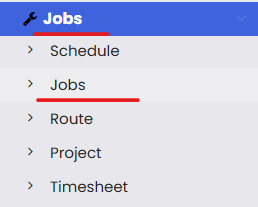
Step 1 – Navigate to Jobs
From the main menu, click Jobs, then click Jobs from the sub-menu. This opens the Job List page.
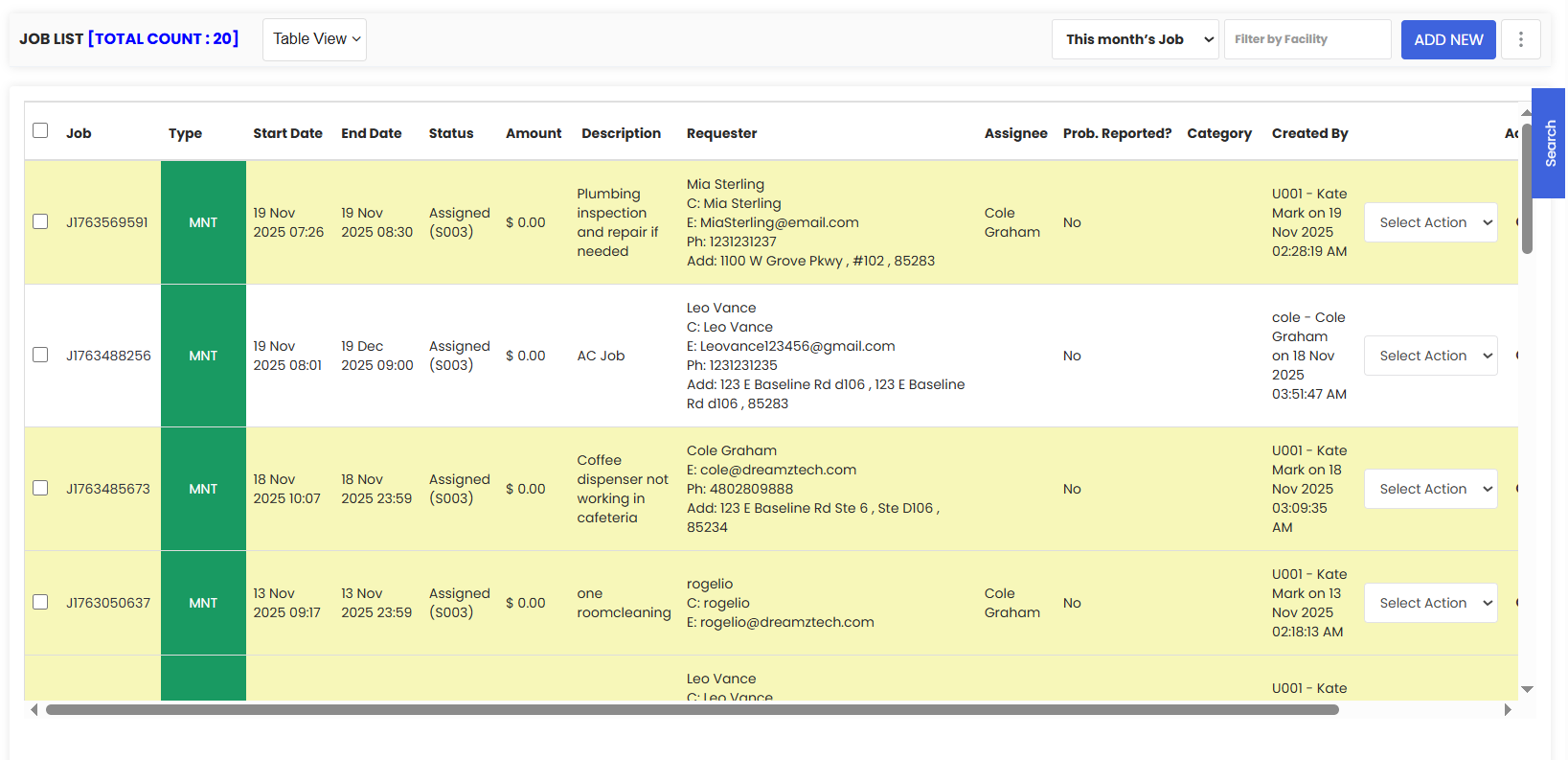
Step 2 – Select the Jobs to Assign
From the Job List, use the checkboxes on the left of each row to select one or more jobs that you want to assign to a technician.
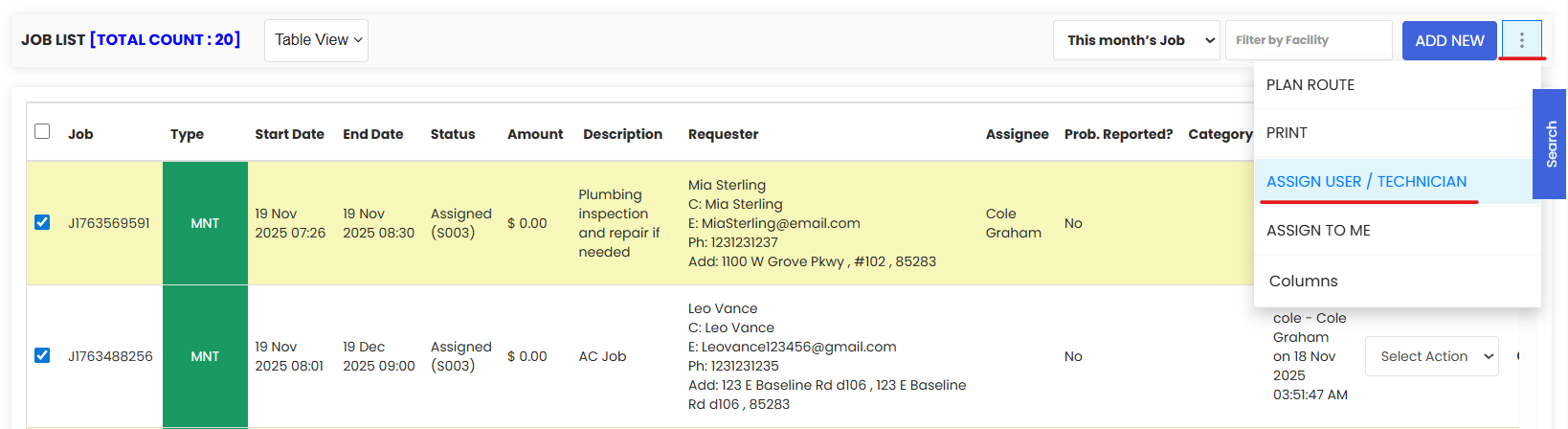
Step 3 – Click "Assign User / Technician"
Once your jobs are selected, click the three dots (⋯) menu in the top right corner of the Job List. From the dropdown, click Assign User / Technician.
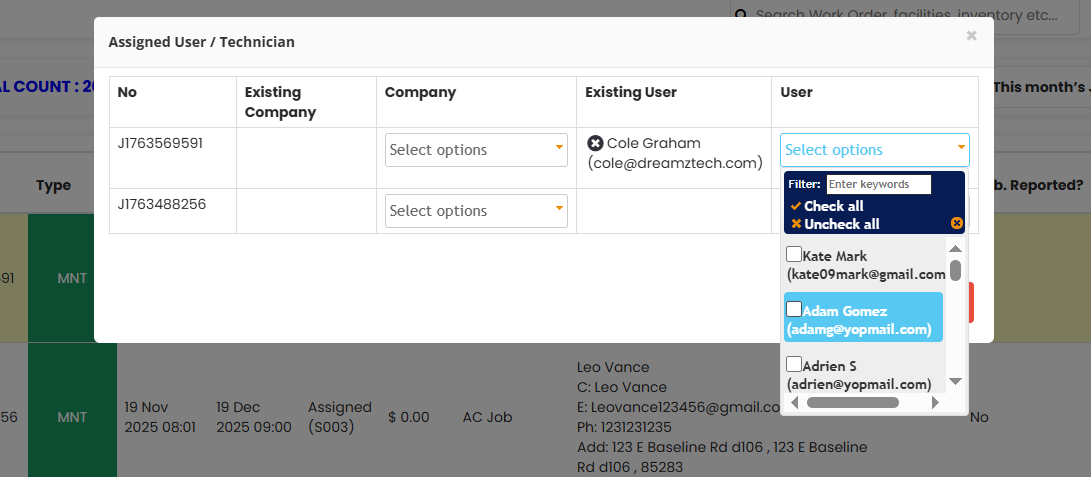
Step 4 – Select Technicians and Save
A pop-up will appear where you can select the users or technicians you want to assign the selected jobs to. Once you have made your selection, click Save. The jobs will be assigned to the chosen technicians immediately.
Tips for Assigning Technicians to Jobs
- Use the bulk assignment feature during morning dispatch to assign the day's jobs to your field team in one action, rather than opening each job individually.
- You can assign multiple technicians to the same set of jobs — useful for team-based tasks or when shared responsibility is required.
- Use the Filter by Facility or search options before selecting jobs to ensure you are assigning the right jobs to the right technician for a specific site or area.
- After assigning, confirm the jobs appear correctly in the Calendar or Kanban view to verify the assignment has been applied as expected.
- If auto-notifications are not enabled, notify the assigned technicians directly after assigning so they are aware of the new jobs and their scheduled times.
Frequently Asked Questions
Can I assign multiple jobs to multiple technicians at the same time?
Yes. You can select multiple jobs using the checkboxes in the Job List, then use the Assign User / Technician option to assign all selected jobs to one or more technicians in a single action.
Where do I find the Assign User / Technician option?
After selecting jobs from the Job List, click the three dots (⋯) menu in the top right corner of the page. The Assign User / Technician option will appear in the dropdown menu.
Will the technician be notified when a job is assigned to them?
This depends on whether auto-notifications are enabled in your DreamzFSM configuration. If they are not, you will need to notify the technician manually after assigning the job.
Can I reassign a job that is already assigned to a technician?
Yes. You can reassign a job at any time by selecting it from the Job List and using the Assign User / Technician option to select a different technician. The previous assignment will be replaced.
Where can I see which technician a job has been assigned to?
The assigned technician is visible directly in the Job List under the Assignee column. You can also see assignments in the Calendar, Kanban, and Map views.