Asset Parent–Child Mapping
Complex equipment is rarely a single unit — it is made up of components, modules, and sub-assemblies that each need to be tracked and maintained. Asset Parent–Child Mapping in DreamzCMMS allows you to build equipment hierarchies by linking sub-assets (components or modules) to a parent asset, giving your team a clear, structured view of how assets relate to each other.
This hierarchy enables more precise maintenance planning, accurate cost attribution, and better spares management — because when a component fails, you can trace it directly to the parent asset it belongs to.
Overview
In DreamzCMMS, a Parent Asset is the primary piece of equipment (e.g., a production line, generator, or HVAC unit), and Child Assets are the components or sub-assemblies that make it up (e.g., a motor, compressor, pump, or control panel).
Once mapped, the parent–child relationship is visible across the system — on asset records, work orders, maintenance history, and cost reports — giving managers and technicians full context when planning or executing maintenance tasks.
Example hierarchy:
- Parent: HVAC Unit – Rooftop 1
- Child: Compressor Unit A
- Child: Air Handling Fan
- Child: Control Panel
How to Set Up Asset Parent–Child Mapping
Step 1 – Navigate to Equipment
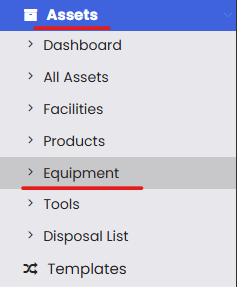
From the left-hand navigation menu, click on Assets, then select Equipment.
Step 2 – Open Parent Child Mapping
On the Equipment listing page, click the three-dot menu (⋮) in the top-right corner. From the dropdown, select Parent Child Mapping.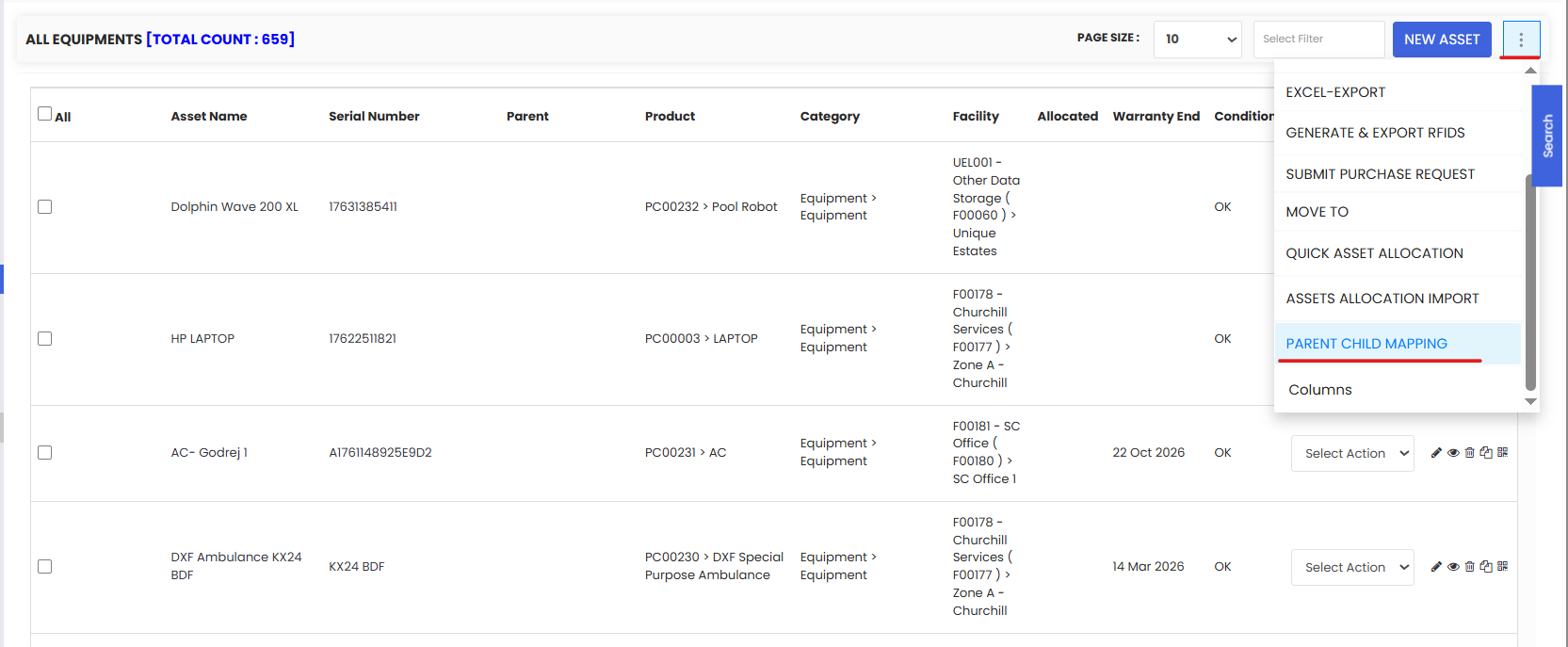
Step 3 – Select the Parent Asset
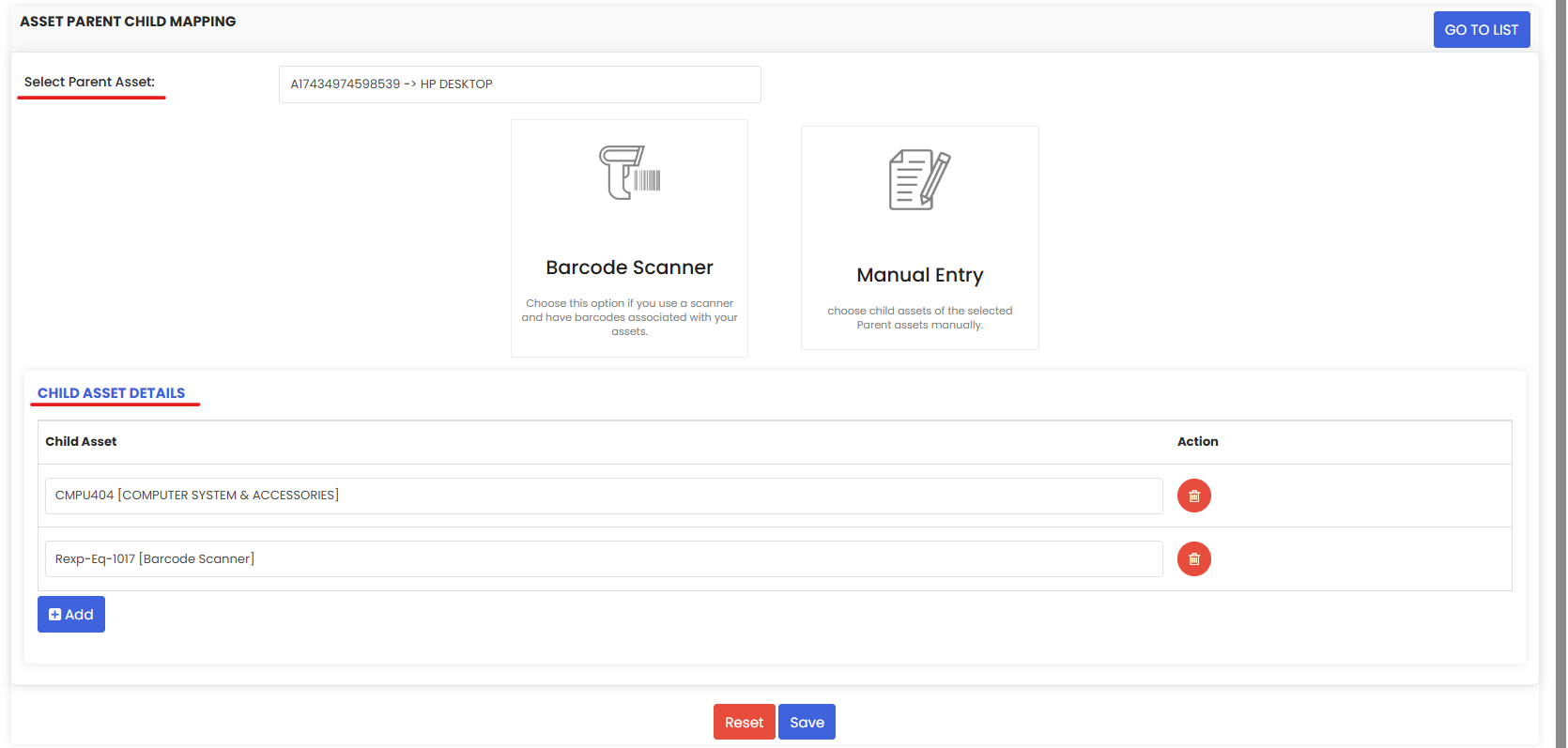
On the Parent Child Mapping page, select the parent asset — the primary piece of equipment to which you want to attach child assets. This is the top-level asset in your hierarchy.
Step 4 – Add Child Assets
You can add child assets to the selected parent using one of two methods:
Option A — Manual Selection
Search for and select the child assets from the list of available equipment records. This is best when you know the asset names and can find them quickly using search or filters.
Option B — Barcode Scanning
Use a barcode scanner to scan the QR code or barcode label on the physical child asset. DreamzCMMS will automatically identify and link the scanned asset as a child of the selected parent. This method is faster and more accurate when working directly in the field or warehouse.
Tip: Barcode scanning is the recommended method when setting up parent–child mappings during a physical asset audit or initial facility setup — it eliminates manual searching and reduces the risk of linking the wrong asset.
Step 5 – Click Save
Once all child assets have been added, click Save to confirm the mappings. The parent–child relationships will be established and reflected across the system.
After Setting Up Mappings — What's Next?
Once your asset hierarchy is in place:
- View the hierarchy on the parent asset's detail page to confirm all child assets are correctly linked.
- Create Work Orders at the child asset level for component-specific maintenance — the parent asset relationship provides full context for planners and technicians.
- Track costs at the component level — expenses logged against child assets roll up to give a complete cost picture for the parent asset.
- Set up PM schedules for individual child components where usage or time-based maintenance applies.
- Review the Log tab on the parent asset to see a consolidated history of all activity across the parent and its children.
Tips for Managing Asset Hierarchies
- Keep hierarchies to two or three levels — Parent → Child → Sub-Child is usually sufficient. Overly deep hierarchies become difficult to navigate and maintain.
- Name child assets clearly — Include the parent asset's name or reference in the child asset name where helpful (e.g., "HVAC Unit 1 – Compressor") so the relationship is obvious even when viewing child assets in isolation.
- Create all child assets first — Before setting up mappings, ensure all component asset records exist in the system. Running the mapping before records exist means you'll need to return and update it later.
- Use barcode scanning for accuracy — When physically tagging and mapping assets at the same time, scanning is faster and eliminates human error in selecting the wrong asset from a list.
- Review hierarchies after asset changes — If a component is replaced or upgraded, update the parent–child mapping to reflect the new child asset. Leaving obsolete components linked to a parent creates confusion in maintenance records.
Frequently Asked Questions
What is the benefit of setting up parent–child relationships?
Parent–child mapping gives your team a structured view of complex equipment. It allows maintenance costs, work orders, and history to be tracked at the component level while still being visible in the context of the parent asset — making it easier to diagnose recurring issues, plan replacements, and report on the total asset cost of ownership.
Can a child asset have its own child assets (sub-children)?
Yes. DreamzCMMS supports multi-level hierarchies, so a child asset can itself be a parent to further sub-assets. Keep hierarchies to a manageable depth to avoid complexity.
Can the same asset be a child of multiple parent assets?
No. Each child asset can only be linked to one parent asset at a time to maintain a clear and unambiguous hierarchy.
Can I remove a child asset from a parent?
Yes. Return to the Parent Child Mapping page, select the parent asset, and remove the unwanted child asset from the mapping. The child asset record itself is not deleted — only the relationship is removed.
Does removing a child asset from a parent affect its work order or maintenance history?
No. The child asset's own maintenance history, work orders, and records remain intact. Only the parent–child relationship link is removed.
Can I view all child assets linked to a parent from the parent's record?
Yes. Open the parent asset's detail page to see all linked child assets listed under the hierarchy or components section.
Related Articles
How to Manage Various Asset Information