Asset Movement
Knowing where your assets are at all times is fundamental to effective asset management. The Asset Movement feature in DreamzCMMS creates a formal record every time an asset is transferred between locations, people, or cost centers — ensuring custody and location information is always accurate, traceable, and audit-ready.
Unlike simply editing the location field on an asset record, Asset Movement captures the full transfer details, including the reason for the move, the date, and who was responsible — building a complete movement history for each asset over its lifetime.
Overview
Asset Movement is used to record and track the physical transfer of an asset from one place or custodian to another. This may include:
- Moving equipment from one facility, floor, or room to another.
- Transferring an asset between departments or cost centers.
- Reassigning custody of an asset from one employee to another.
- Returning an asset from a job site back to a central store or warehouse.
Every movement is logged in the asset's history, giving managers full visibility into where assets have been and who has held them — essential for audits, insurance, and compliance.
How to Record an Asset Movement
Step 1 – Navigate to Equipment
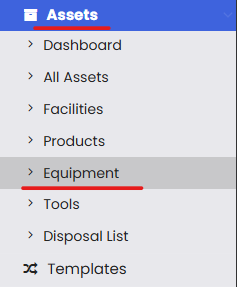
From the left-hand navigation menu, click on Assets, then select Equipment.
Step 2 – Select the Asset to Move
On the Equipment listing page, find the asset you want to move. Click the three-dot menu (⋮) next to it and select Move To from the dropdown options.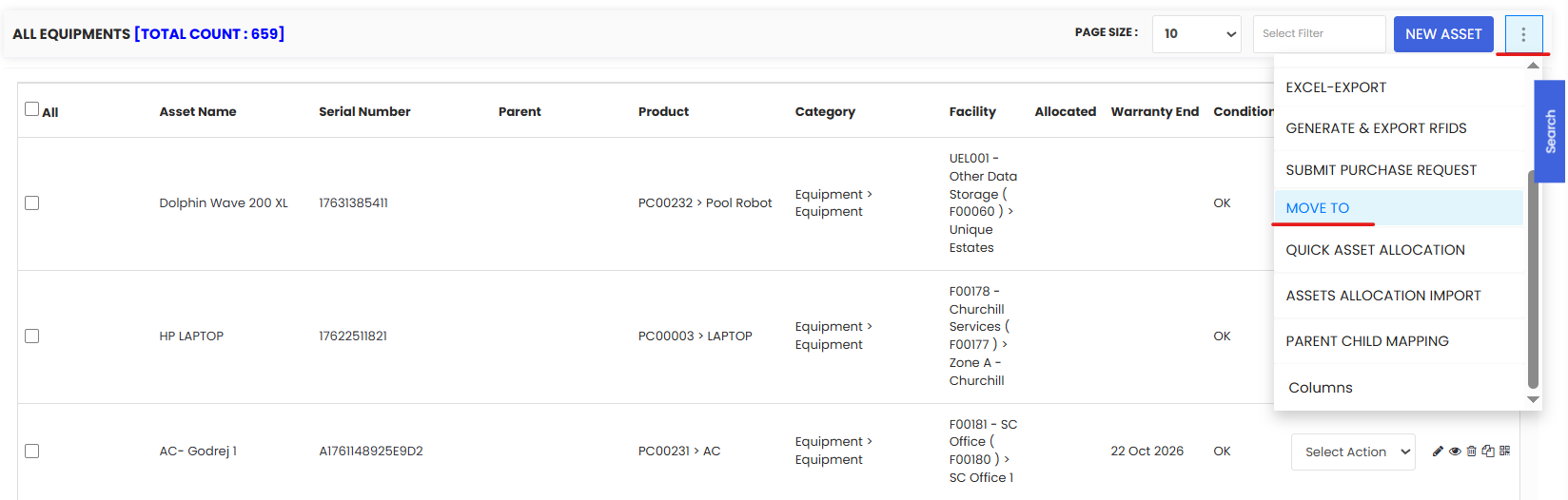
Step 3 – Fill in the Asset Movement Details
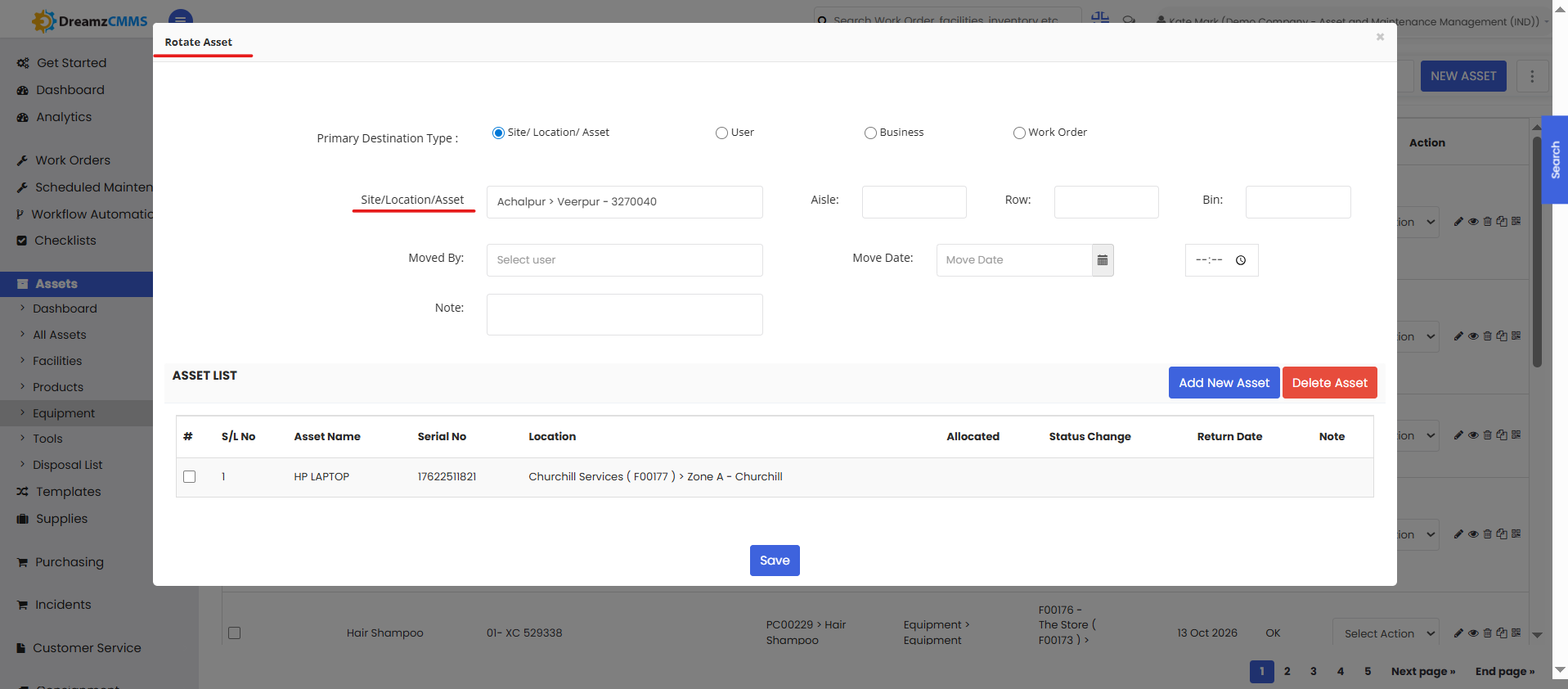
The Asset Rotation pop-up will appear. Complete the following fields:
- New Location (required) — Select the destination facility, building, floor, or room where the asset is being moved to. Only locations already set up in DreamzCMMS will appear in the dropdown.
- Move Date (required) — Enter the date the physical move takes place or took place. This is recorded in the movement history.
- Reason / Notes (recommended) — Add a brief explanation for the move (e.g., "Relocated for Project X", "Transferred to Building B after expansion", "Returned from site — back to main store"). These notes form part of the audit trail.
- Additional Details (optional) — Fill in any other fields shown in the pop-up relevant to the transfer, such as cost center or responsible person.
Step 4 – Click Save
Click Save to record the movement. The asset's location will be updated in DreamzCMMS to reflect the new destination, and the movement will be logged in the asset's history for future reference.
Tips for Managing Asset Movements
- Always use Asset Movement instead of manually editing the location field — editing the location field directly does not create a movement record, meaning there is no audit trail of where the asset has been.
- Record movements promptly — Log the movement in DreamzCMMS as soon as the physical transfer takes place to keep records accurate in real time.
- Add descriptive reasons for every move — Even a brief note (e.g., "Site deployment for Contract #1042") makes the movement history significantly more useful during audits or investigations.
- Verify locations after bulk relocations — If many assets are moved during a facility reorganization or project mobilization, spot-check asset records after the move to confirm all locations have been updated correctly.
- Use the Log tab regularly — Periodically review the movement history for high-value or compliance-critical assets to ensure no unauthorized or unrecorded transfers have occurred.
Frequently Asked Questions
What is the difference between Asset Movement and Quick Asset Allocation?
Asset Movement records a change in the physical location of an asset (e.g., moved from Building A to Building B) and creates a movement audit trail. Quick Asset Allocation assigns custody of an asset to an employee or customer but does not automatically update the physical location. For a complete record, use both features when an asset is transferred to a new person at a new location. See Quick Asset Allocation
Does recording a movement automatically update the asset's location on its record?
Yes. When you save an asset movement, the asset's location field is automatically updated to the new destination in DreamzCMMS.
Can I move multiple assets at once?
The current Asset Movement flow handles one asset at a time via the Move To option. For bulk location updates, check whether a bulk update option is available on the Equipment listing page.
Where can I see the full movement history of an asset?
The complete movement history is available in the Log tab of the asset's detail page, alongside other activity records such as work orders, events, and meter readings.
Can I record a past movement with a historical date?
Yes. The Move Date field allows you to enter the actual date the physical move took place, even if you are recording it in the system after the fact.
What if I selected the wrong destination location?
Record a new movement to the correct location. This will update the asset's current location, and the incorrect move will remain in the history as part of the audit trail. Add a note in the reason field explaining the correction.
Related Articles
How to Manage Various Asset Information