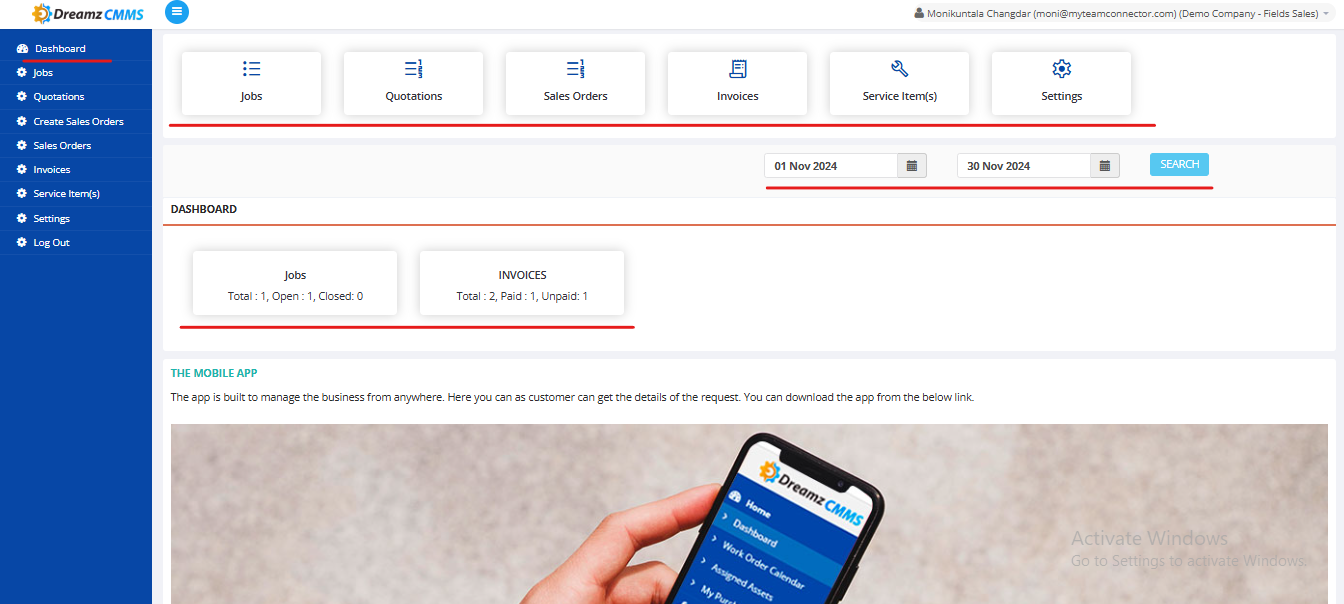
The Customer Portal Dashboard in DreamzCMMS provides a user-friendly interface for managing business interactions and tracking key metrics.
Key Features:
Navigation Buttons:
- Access to critical modules: Jobs, Quotations, Sales Orders, Invoices, Service Items, and Settings.
Dashboard Overview:
- Displays job summaries (e.g., Total, Open, Closed).
- Tracks invoice statuses (e.g., Paid, Unpaid).
Date Filter:
- Allows users to search data within a specific date range.
Mobile App Integration:
- Includes a link for downloading the mobile app for managing business operations on the go.
- Includes a link for downloading the mobile app for managing business operations on the go.
Benefits:
- Centralized Access: All key modules are accessible from a single interface.
- Real-Time Tracking: Provides up-to-date insights into jobs and invoices.
- Mobile Flexibility: Enables users to manage requests anywhere with the app.
This dashboard simplifies customer interactions and enhances visibility into operations.
Here is a reference video: