Login using your user id
It redirects to job dashboard where you can see the jobs you are assigned
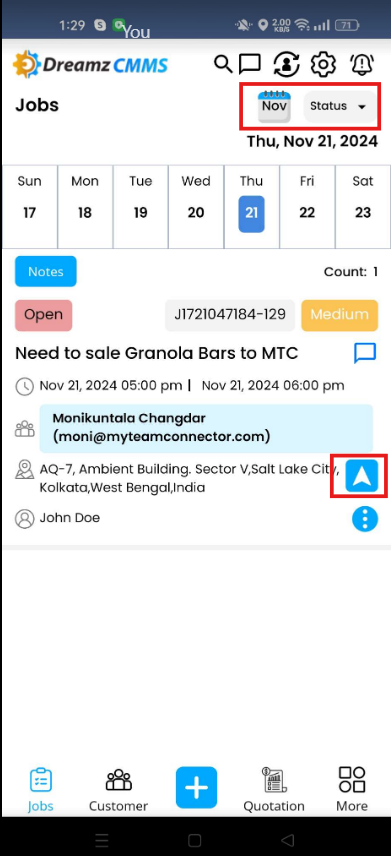
By default it shows the current day jobs. You can tap on the calendar icon to view jobs for this month (by default). You can also view jobs present in previous month and next months as well using the left and right arrows respectively. You can also get a map view to see the job location by tapping on the direction arrow highlighted below.

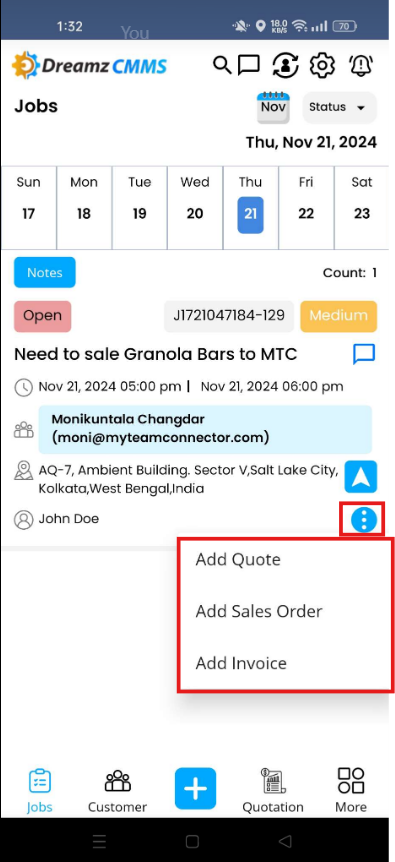
Further you also have the option to add quotation, sales order and invoices as well by tapping on the 3 dots on the job.
How do you see your assigned job?
Help Center
›
DreamzCMMS - Field Sales Management
›
Lesson 6 - Field Sales using DreamzCMMS Mobile App
›
How do you see your assigned job?
Was this article helpful?
That’s Great!
Thank you for your feedback
Sorry! We couldn't be helpful
Thank you for your feedback
Feedback sent
We appreciate your effort and will try to fix the article