Fixed Asset Report
The Fixed Asset Report provides a consolidated view of asset records within the CMMS system, including asset financial details, depreciation values, and disposal information. This report helps organizations track asset lifecycle performance, financial impact, and compliance-related data in a structured and exportable format.
Overview
The Fixed Asset Report is designed to give users a detailed summary of asset data, including:
Purchase cost
Depreciation (YTD and accumulated)
Disposal details
Gain or loss calculations
Financial summaries
This report is especially useful for finance teams, auditors, and asset managers who need clear visibility into asset value changes and disposal records.
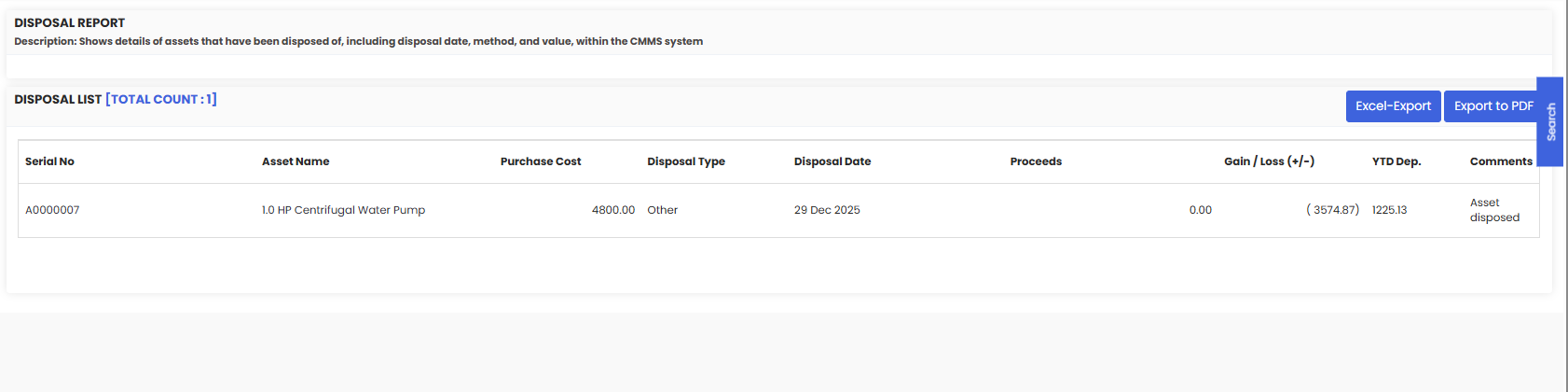
From the screenshot provided, the Disposal Report section shows detailed information about assets that have been disposed of, including financial impact calculations and export options.
Here is a reference video:
Before You Begin
Ensure you have access to the Reports or Asset Management module.
Confirm that assets have proper financial information entered (purchase cost, depreciation method, disposal date, etc.).
Make sure disposal entries are completed correctly for assets that have been retired or sold.
Verify you have permissions to export reports (Excel or PDF).
How to Access the Fixed Asset Report
Step 1 — Navigate to Reports
Go to the Reports section in the system and select Disposal Report.

Step 2 — View the Disposal Report Section
Within the Fixed Asset Report, you may see a section similar to the screenshot labeled:
Disposal Report
Description:
Shows details of assets that have been disposed of, including disposal date, method, and value within the CMMS system.
Below this description, you will see a table such as:
Disposal List [Total Count: X]
This table includes the following columns:
Serial No – Unique asset identifier
Asset Name – Name or description of the asset
Purchase Cost – Original acquisition cost
Disposal Type – Method of disposal (e.g., Sold, Scrapped, Other)
Disposal Date – Date asset was removed from service
Proceeds – Amount received from disposal (if applicable)
Gain / Loss (+/-) – Financial impact of disposal
Positive value = Gain
Negative value = Loss
YTD Dep. – Year-to-date depreciation at time of disposal
Comments – Notes such as “Asset disposed”
This structured layout helps track financial consequences of asset retirement.
Step 3 — Export the Report
Excel-Export – Download the report in spreadsheet format for financial analysis.
Export to PDF – Generate a PDF version for audit documentation or management reporting.
These export options are useful for accounting reconciliation and compliance documentation.
Understanding Gain / Loss Calculation
The Gain or Loss is calculated based on:
Book Value at Disposal vs. Proceeds Received
If proceeds exceed book value → Gain
If proceeds are lower than book value → Loss
If no proceeds → Typically results in a full write-off loss
After Reviewing the Fixed Asset Report
Finance teams can reconcile asset disposals.
Asset managers can verify lifecycle tracking accuracy.
Auditors can validate depreciation and write-offs.
Management can analyze capital expenditure efficiency.
The report supports financial transparency and asset governance.
Tips for Effective Fixed Asset Reporting
Ensure purchase cost and depreciation methods are correctly set during asset creation.
Record disposal details promptly to maintain financial accuracy.
Use consistent disposal types for better reporting clarity.
Review gain/loss patterns to identify trends in asset performance.
Frequently Asked Questions (FAQs)
1. What is the purpose of the Fixed Asset Report?
The Fixed Asset Report provides a structured overview of asset financial data, including purchase cost, depreciation, disposal details, and gain/loss calculations for better financial and operational tracking.
2. What does the Gain / Loss column represent?
It shows the financial difference between the asset’s book value at disposal and the proceeds received. A negative value indicates a loss; a positive value indicates a gain.
3. Can I export the Fixed Asset Report?
Yes. The report can be exported using Excel-Export for financial analysis or Export to PDF for audit and compliance documentation.
4. Why does an asset show a loss even if it was fully depreciated?
If an asset has no proceeds at disposal (e.g., scrapped) and still has a remaining book value, the system records the difference as a loss. This reflects proper accounting treatment.